OpenAI announced ChatGPT Work:https://openai.com/index/chatgpt-for-your-most-ambitious-work/ on July 9th, and have been furiously iterating on it ever since. It is an extraordinarily confusing and very powerful product. Here’s what I’ve figured out about it so far.
The more interesting version of ChatGPT Work is the one that runs in the cloud. This can be accessed via chatgpt.com:https://www.chatgpt.com/ or through the ChatGPT mobile apps. Let’s call it Work Cloud .
If you install the ChatGPT desktop app—the app that used to be called Codex—you gain access to a thing called ChatGPT Work that can access files and run programs directly on your computer. Let’s call that one Work Local . This one feels more like regular Codex re-skinned to be less intimidating to non-software-developers.
For the rest of this article I’m going to talk exclusively about Work Cloud.
The interface for accessing Work is a tab selector, which presents it as an alternative to Chat:

The obvious question is when should I use Chat, and when should I use Work?
OpenAI’s official answer:https://learn.chatgpt.com/docs/get-started-with-work to that question is:
Use Chat when you want an answer, explanation, brainstorm, or short draft. Use ChatGPT Work when you want ChatGPT to complete a task with a clear outcome, such as a brief, deck, analysis, recurring update, workflow, or file you can review and use.
I find that almost entirely useless, because I’ve been using regular ChatGPT Chat for all of those task categories for years!
The better question then is what features does Work have that are missing from Chat?
After extensive experimentation I think I’ve mostly figured that out:
In Work, you get the option to pick GPT-5.6 Sol, Luna, or Terra, each with Light, Medium, High, Extra High, Max, or Ultra reasoning levels. You can also pick GPT-5.5 at Light, Medium, High, or Extra High.
These look to be the same models that are available through the OpenAI API.
My current understanding from using Codex is that Ultra is a special mode that more eagerly delegates to sub-agents.
I believe ChatGPT Work sessions are billed against your Codex allowance, while ChatGPT Chat Sessions get their own, separate allowance. This may help explain the model availability differences.
As a long-time fan of the Code Interpreter pattern:https://simonwillison.net/tags/code-interpreter/—pioneered by OpenAI in 2023—this is by far the most exciting feature of ChatGPT Work (Cloud) for me.
The code execution environment can now talk to the rest of the internet!
ChatGPT Chat can’t do this—if you ask it to install additional software packages or interact with websites or APIs that access will be blocked by the container proxy.
(Weirdly, back in January it grew the ability to install packages:https://simonwillison.net/2026/Jan/26/chatgpt-containers/, but that doesn’t seem to work any more. I wish they had better changelogs!)
Claude’s equivalent container has allowed restricted internet access since it launched last September:https://simonwillison.net/2025/Sep/9/claude-code-interpreter/. Claude can install packages from PYPI and NPM and clone repositories from GitHub. But that is about it: the allowlist of domains is very short.
ChatGPT Work allows a whole lot more than that. It can be configured with a specific list of allowed domains, but the default appears to be open to all.
This makes Work an incredibly useful tool. You can have it clone GitHub repositories, install their dependencies, then use them to interact with the rest of the web!
Another killer feature of ChatGPT Work is the browser tool:https://learn.chatgpt.com/docs/browser?surface=web. ChatGPT Work can launch a full Chrome instance, load websites, fill out forms, and take screenshots.
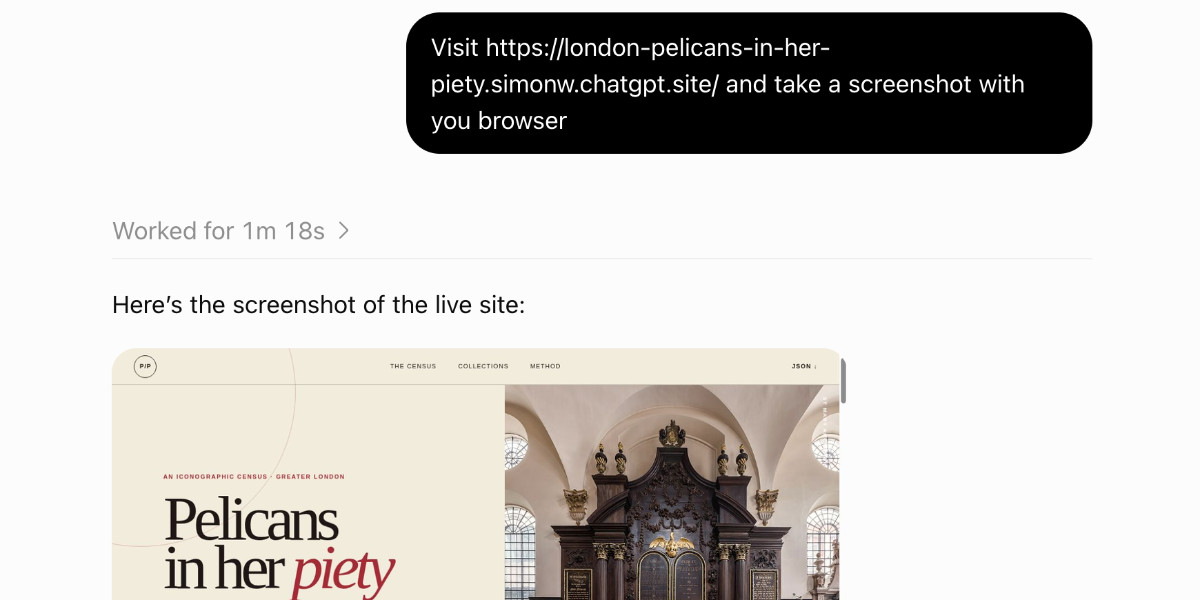
", followed by the reply "Here's the screenshot of the live site:" and an embedded screenshot of a website." style="max-width: 100%">
If a site requires sign in the browser can prompt you to take over and enter both passwords and 2FA codes, without round-tripping those credentials through the model itself.
It can even run JavaScript against the DOM of loaded pages. I prompted:
Load simonwillison.net in your browser and extract the headings using JavaScript
ChatGPT Work fired up a browser instance and ran the code:
This feels a lot like my shot-scraper javascript:https://shot-scraper.datasette.io/en/stable/javascript.html tool, only now I can access it on my phone!
ChatGPT Chat gets a fresh filesystem for each chat session. These cannot be accessed from any other session.
In ChatGPT Work each session gets its own scratch folder—named something like /workspace/scratch/e00a0a017944 —but each of those are persisted across sessions, so you can access files from previous chats. I have 171 folders in /workspace/scratch right now!
As far as I can tell that /workspace volume is mounted to all Work sessions that are currently running—file edits from one can be instantly seen by the others. They don’t seem to share the same process space though, and localhost servers running in one can’t be accessed from another.
ChatGPT Work has the ability to build and deploy entire websites, using Cloudflare Workers. These can have HTML and JavaScript and can run server-side features too, including stateful features on top of Cloudflare D1 and R2.
Here’s a simple site I built with this feature:
london-pelicans-in-her-piety.simonw.chatgpt.site:https://london-pelicans-in-her-piety.simonw.chatgpt.site/

Figure out all of the places in London with a pelican in her piety, then turn that into a JSON file and build a ChatGPT sites site about them
(A pelican in her piety is a fascinating piece of medieval Christian imagery:https://devonchurchland.co.uk/blog/pelican-in-her-piety/#What-is-a-Pelican-In-Her-Piety—once you know about them you’ll find them all over the place.)
These sites default to being private to the user that created them, but you can make them public and (on team plans) share them with other specific individuals.
There’s not much to say about this one. ChatGPT Chat can’t run sub-agents. ChatGPT Work can. This is very much a power-user feature: if you are running a complex project that can benefit from multiple parallel agents working together, Work can do that.
Another feature that seems to have migrated from regular ChatGPT to ChatGPT Work at some point. You can prompt ChatGPT Work like this:
run a search to see if Waymo have announced a launch date for Half Moon Bay every day at 8am
This will schedule a prompt to run on that frequency. These prompts can decide that nothing interesting has happened, or they can decide to notify you of some new information.
Update : Actually this seems to work in ChatGPT Chat as well.
It’s still worth noting here though, as it can be used in conjunction with other ChatGPT Work exclusive features. You can set a scheduled task to update a ChatGPT Site on an hourly basis, for example.
An open question for me right now is how safe all of this stuff is.
My lethal trifecta model:https://simonwillison.net/2025/Jun/16/the-lethal-trifecta/ warns about the risks inherent in any agent system that combines access to private data with exposure to untrusted content and a way to communicate stolen information back to an attacker.
I’d love to hear more from OpenAI about how they protect ChatGPT Work sessions against prompt injection attacks. I expect their answer is the same auto-review mechanism:https://learn.chatgpt.com/docs/sandboxing/auto-review as Codex.
Figuring this all out took way more work than it should have.
I think there are two key problems here:
If the ChatGPT Work documentation included the exact system prompt and tool descriptions used by the agent I wouldn’t have needed to write this post.
This is Understanding ChatGPT Work by Simon Willison, posted on 30th August 2026:/2026/Aug/30/.
Previous: Conceptual integrity and counting lines of code:/2026/Aug/19/conceptual-integrity-and-counting-lines-of-code/
Sponsor me for $10/month and get a curated email digest of the month's most important LLM developments.

 Scan to open this article