By coupling native image generation directly with structured prompt synthesis, you turn your AI agent from a text generator into an image studio producing clean, consistent images grounded in developer specs.
Here is what you will get out of this deep dive:
📝 About this series: Welcome to Elevating Antigravity Agent Skills series, a 5-part engineering guide to mastering the agent tools that reduce orchestration tax and transform AI agents into autonomous collaborators: ask_question , generate_image , define_subagent + invoke_subagent , send_message and manage_subagents .
Many of us building web applications, developer tools, or component libraries have used grey placeholder boxes while waiting for sample visual assets.
This is where the generate_image :https://antigravity.google/docs/hooks?utm_campaign=CDR_0xc0d3ff05_awareness_b536569204&utm_medium=external&utm_source=blog#interaction-and-media tool comes in. When an Antigravity agent executes generate_image , it synthesizes text prompts and visual parameters into images saved directly into the conversation artifact storage.
Passing un-processed prompts without structure directly to generate_image leads to inconsistency. By encoding lighting, camera, and scene specifications into your skill's prompt generator, your agent produces images that consistently match your intent.
Before diving into skill authoring, let's review how Antigravity manages generated media.
When generate_image runs, the system automatically saves the output asset to the conversation's internal artifacts directory ( /brain/ / ). The tool returns the absolute file path, allowing your skills to render the asset directly in chat responses using standard markdown syntax:  .
To see this architecture in action, let's examine an example generating-mock-images :https://github.com/GoogleCloudPlatform/devrel-demos/blob/main/elevating-antigravity/skills/generating-mock-images/SKILL.md skill. Using a plant and flower e-commerce store as my example, this skill generates mock product assets, displays the resulting image for interactive review, and handles workspace asset persistence.
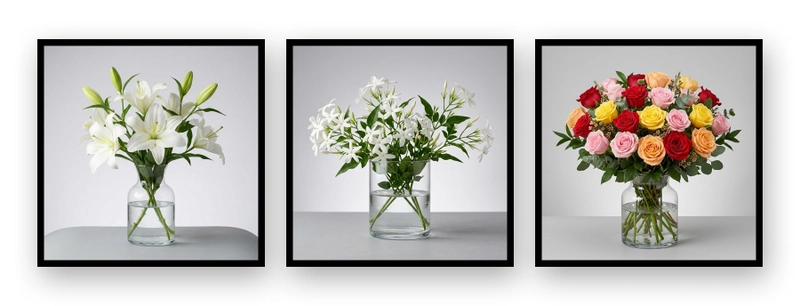
:https://media2.dev.to/dynamic/image/width=800%2Cheight=%2Cfit=scale-down%2Cgravity=auto%2Cformat=auto/https%3A%2F%2Fdev-to-uploads.s3.us-east-2.amazonaws.com%2Fuploads%2Farticles%2Fgw4uw6nd6itqwdpdhcsr.jpg
Figure 1: When we prompt "Create mock photo of white lilies." or "...Jasmine", or "...multi-colored roses", the generating-mock-images skill is auto-discovered by the agent and read into context. The skill instructs the agent to follow the playbook we created.
The skill pairs the selected product subject (user provided houseplant or floral arrangement) with hardcoded photography parameters detailed in the skill:
Following the skill instructions, the agent automatically creates and issues a structured tool call to generate_image . The following is a mock representation of what that structured tool call would look like:
Note, not shown in this example but generate_image natively supports visual composition. Passing up to three absolute file paths into the ImagePaths array parameter instructs the agent to blend existing logos, background textures, or reference wireframes into composite graphics.
Upon receiving the generated image path from generate_image , the agent renders the asset immediately in chat:
In my previous post, Elevating Antigravity Agent skills with interactive UI workflows:https://www.linkedin.com/pulse/elevating-antigravity-agent-skills-interactive-ui-james-o-reilly-kz8fc/, I established how to convert passive agents into active interviewers using the ask_question tool. By interrogating developers upfront, we eliminated prompt ambiguity.
Rather than assuming the generated asset is immediately production-ready, the agent prompts the developer using ask_question :
If the developer approves the asset, the agent copies the file from temporary artifact storage to /public/images/ and returns a clickable markdown link:
If the developer chooses to delete or regenerate, the agent purges the temporary artifact to prevent uncurated asset accumulation.
If your agent dumps uncurated artifacts directly into production asset paths, you aren't automating design, you're automating visual tech debt.
As you integrate expensive tool calls, like generate_image into automated developer workflows, observe these three rules to maintain consistency and efficiency:
Avoid passing raw user inputs directly to generate_image . Build a prompt generator inside your skill that injects specific parameters (such as scene, lighting, camera, and style preferences) to ensure deterministic outputs across runs.
Use the absolute artifact path returned by generate_image and move approved images to a permanent location. Storing assets in temporary directories ( /tmp ) causes link decay when context windows clear or workspace sessions restart.
Before triggering generate_image , instruct your skill to check if a valid asset with the target ImageName already exists. Re-running image generation without parameter changes wastes compute budget and slows down workflow execution.
Now that you have mastered parameterized image generation with generate_image , here is an engineering challenge to take your visual asset skills to the next level:
Build an Automated Multi-Aspect Ratio Asset Suite Generator.
Currently, our skill requires the user to include details in their prompt.
Extend your skill's prompt generator to accept target layout presets (e.g., Hero Banner , Product Card , Mobile Thumbnail ) or aspect ratios (e.g. 1:1 , 2:1 , 4:3 , 16:9 ) using the ask_question tool.
Extend your skill's prompt generator to use pre-made reference images passed into generate_image using ImagePaths param. You can include up to 3 images.
Did you attempt the challenge? Share your skill's strategy in the comments below!
Static text descriptions and broken image icons belong to an earlier generation of developer tooling. By leveraging parameterized asset generation in generate_image , you empower your agents to produce clean, consistent and visually grounded technical artifacts.
Take 15 minutes today to audit your component scaffolding and asset generation skills.

Templates let you quickly answer FAQs or store snippets for re-use.
Are you sure you want to hide this comment? It will become hidden in your post, but will still be visible via the comment's permalink:#.
For further actions, you may consider blocking this person and/or reporting abuse:/report-abuse
Google AI Studio is the fastest way to start building with Gemini. Ready to build?
DEV Community:/ — A space to discuss and keep up software development and manage your software career
Built on Forem:https://www.forem.com — the open source:https://dev.to/t/opensource software that powers DEV:https://dev.to and other inclusive communities.
Made with love and Ruby on Rails:https://dev.to/t/rails. DEV Community © 2016 - 2026.
We're a place where coders share, stay up-to-date and grow their careers.


 Scan to open this article