How do you ship a software product with 0 lines of manually-written code?
A friend asked me this today, and I realized I didn't have a simple answer. So I dug deeper.
It turns out the answer is in how you engineer your harness.
Wait now, what? What is harness engineering?
There is a reason this is the most important trend right now around coding agents. The biggest question these days is how to validate AI-generated code without reading every single line. How do you make sure an agent doesn't break production or delete your data?
A blog by OpenAI:https://openai.com/index/harness-engineering/ shared an interesting experiment where a team of 3 engineers have built and shipped an internal beta of a software product with 0 lines of manually-written code. Every line of code: application logic, tests, CI configuration, documentation, observability, and internal tooling, has been written by Codex.
How did they do it? They didn't write the app. They designed the harness.
Think of an AI agent like a powerful racehorse. The harness is the track, the blinders, and the jockey's reins that keep it running in the right direction instead of jumping into the stands.
As my colleague Arthur Thompson explained today: for agents — the harness is composed of all the deterministic components that wrap the LLM.
Balaji Subramaniam details those deterministic components in his blog:https://medium.com/google-cloud/harness-engineering-for-multi-agent-systems-using-google-adk-2-0-e248b885cb95 — the orchestration layer, execution sandboxing, state persistence, and verification tools.
If you want to build reliable agentic systems, your job shifts from writing the logic to designing the environment. Here is what you need to focus on:
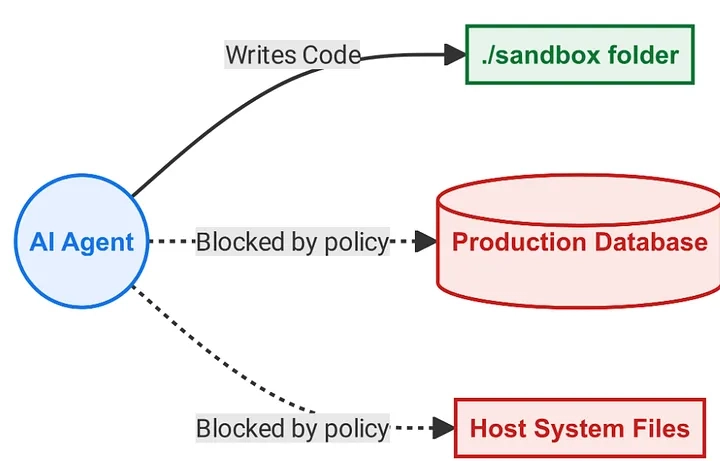
What does this look like in practice? Here is a simple example using the Google Antigravity SDK:https://antigravity.google/product/antigravity-sdk?utm_campaign=CDR_0x91b1edb5_default_b550513795&utm_medium=external&utm_source=blog with Google's ADK:https://adk.dev/2.0/ to configure a local harness. Notice how we are strictly bounding the agent to a specific workspace (workspaces=["./sandbox"]) and giving it a place to save its memory (save_dir="./trajectories" ) so it can learn from previous experience:
:https://media2.dev.to/dynamic/image/width=800%2Cheight=%2Cfit=scale-down%2Cgravity=auto%2Cformat=auto/https%3A%2F%2Fdev-to-uploads.s3.us-east-2.amazonaws.com%2Fuploads%2Farticles%2F706wjvl4dxy8dnxgkbib.png
With this design in place, you can drop your legacy code into the sandbox, write a simple loop to run unit tests against it, and let the agent iteratively fix its own bugs.
So, how do we actually run tests against this sandboxed agent?
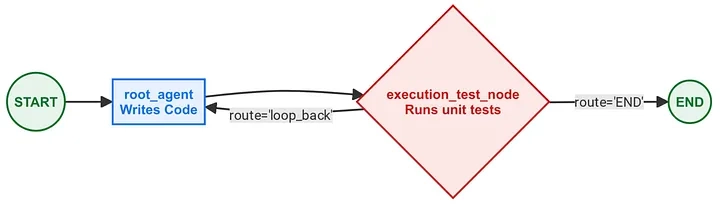
In modern harness engineering, tests are an active part of the agent's workflow graph. Using Google's ADK 2.0:https://adk.dev/2.0/, which introduces graph-based workflows, you can define a test validation step as a simple routing node.
If the test passes, the job is done. If it fails, the harness automatically loops the error back to the agent to try again. Notice the built-in 'kill switch': we track the iteration count so if the agent gets stuck in an infinite loop of breaking and fixing code, the harness safely pulls the plug.
If you want to see this test routing pattern in action, you can check out an example with a full implementation in Balaji's ADK harness repository :https://github.com/balajismaniam/adk-harness-engineering/blob/main/workflows/workflows.py.
To connect the agent and the test node, you can use a Workflow graph to map out exactly how the execution should flow without needing complex, nested Python while loops.
Think of this as drawing the actual lanes on the racetrack:
:https://media2.dev.to/dynamic/image/width=800%2Cheight=%2Cfit=scale-down%2Cgravity=auto%2Cformat=auto/https%3A%2F%2Fdev-to-uploads.s3.us-east-2.amazonaws.com%2Fuploads%2Farticles%2Fe6gyazb82hdpd8wqq4dv.png
Congratulations! you've built an autonomous system. The agent writes the code and hands it off to the test node. If the test fails and returns a loop_back route, the agent tries again with the error log in hand.
See more examples of loop patterns in ADK samples. :https://github.com/google/adk-python/tree/main/contributing/samples/workflows/loop
You might wonder why you need a Python script to run an agent. In a normal chat window, you are the harness: you copy the error logs and babysit the model. A software harness lets the system babysit itself, allowing you to fully automate test-driven coding or safely refactor massive legacy codebases.
To run this self-healing loop on your own machine today, the setup takes less than five minutes:
From there, you can swap out our simple test node for a subprocess that actually executes pytest or npm test against your sandbox, and you will have a fully functioning repair loop.
If you are ready to scale this up, you can download the full IDE and CLI at antigravity.google:https://antigravity.google/?utm_campaign=CDR_0x91b1edb5_default_b550513795&utm_medium=external&utm_source=blog, explore the Antigravity managed agent:https://ai.google.dev/gemini-api/docs/antigravity-agent?utm_campaign=CDR_0x91b1edb5_default_b550513795&utm_medium=external&utm_source=blog for remote execution and google's ADK 2.0:https://adk.dev/2.0/ for using graph based workflows.
My colleagues at Google have put together some incredible guides on where to go next. To learn how to build secure environments for your agents, check out Sara's codelab showcasing Cloud Run sandboxes:https://codelabs.developers.google.com/codelabs/cloud-run/cloud-run-personal-agent-coffee-shop?utm_campaign=CDR_0x91b1edb5_default_b550513795&utm_medium=external&utm_source=blog. If you want to master self-correction, Balaji Subramaniam recently published a deep dive on Loop Engineering for Coding Agents:https://medium.com/@BalajiBuilds/61c30c9e36ca. And to see all of this applied to a massive enterprise use case, read James O'Reilly's breakdown of Automating legacy modernization at scale using agentic pipelines and Antigravity:https://codelabs.developers.google.com/automating-modernization-with-antigravity?utm_campaign=CDR_0x91b1edb5_default_b550513795&utm_medium=external&utm_source=blog.

Templates let you quickly answer FAQs or store snippets for re-use.
Are you sure you want to hide this comment? It will become hidden in your post, but will still be visible via the comment's permalink:#.
For further actions, you may consider blocking this person and/or reporting abuse:/report-abuse
Google AI Studio is the fastest way to start building with Gemini. Ready to build?
DEV Community:/ — A space to discuss and keep up software development and manage your software career
Built on Forem:https://www.forem.com — the open source:https://dev.to/t/opensource software that powers DEV:https://dev.to and other inclusive communities.
Made with love and Ruby on Rails:https://dev.to/t/rails. DEV Community © 2016 - 2026.
We're a place where coders share, stay up-to-date and grow their careers.

 Scan to open this article