今年的 iOS 升级可以说是一种“雪豹式更新”:https://medium.com/@michaelswengel/macos-27-golden-gate-could-be-apples-next-snow-leopard-if-they-don-t-screw-it-up-c14872a950c8。这意味着新功能不多,而是专注于修复已损坏的内容并加快操作系统各项程序的运行速度。应用启动、照片搜索结果和 AirDrop 传输速度都应该更快。信息应用现在支持内联回复以及 RCS 信息的端到端加密。液态玻璃视觉(Liquid Glass)更加精细,硬边和文字的可读性更好。这些都是很棒的更新,特别是对于使用老旧 iPhone 的用户来说。但此次更新中最大、最受期待的变化无疑是,苹果终于真正发布了全新改进的 Siri AI,以一个可选择的测试版形式出现。这一次,我认为苹果可能真的做到了。或者至少终于为 Siri 的成功版本奠定了基础。
上周,我在考虑是否有时间去城市里的一个免费演唱会。演出长达四小时,有三支表演队伍,但我其实只想看一支。我在活动页面找不到乐队表演的顺序,这意味着这是一个完美的机会来测试 Siri AI 的实力。于是我从屏幕顶部向下滑动,问道:“乐队的表演顺序是什么?”Siri 转动了它的新小轮子几秒钟,然后正确地告诉我我想知道的信息:我想看的那支乐队是最后一个表演。
它几乎让我在大多数情况下都不再打开浏览器了
新的 Siri AI 的承诺是改变你使用手机的方式。以前,你需要先打开一个应用,然后告诉应用你想做什么(叫车、设定计时器、订午餐);现在,你可以先说出你想做的事情,Siri AI 会尝试浏览它可以获取的所有应用和信息来处理其余的部分。所以当我询问音乐会相关信息时,Siri 会先查看网页内容,然后搜索网络,找到答案并呈现给我。我不需要在浏览器标签之间切换或查看乐队的 Instagram 页面;信息就直接呈现出来了。
在我使用 Siri AI 的一个月里,它用各种不同的方式让我感到惊讶。在苹果开发者大会测试测试版的第一天,我能够问“你能把我的 WWDC 简报添加到我的日历吗?”Siri 会查看我的电子邮件,解析数据,并将六个单独的活动按照正确的时间添加到我的日历中。我需要说明的是,它只能添加到我的 Apple 日历,但我稍后会解释原因。
屏幕感知可能是对我最有帮助的新增功能。能够询问 Siri 关于屏幕上内容的信息为我节省了大量点击操作。当它能够利用这种屏幕感知采取行动时,比如将事件添加到我的日历或指导我去屏幕上显示的地址,那就更好了。
Siri 能够完成我要求的任务的次数比我预期的要多,而且当它执行一些稍微复杂的任务时,感觉就像魔法一样。但当它遇到瓶颈时,我就会想起为什么要达到“它就是能用”的境界还需要一些努力,在那个境界下,Siri 无法工作是例外,而不是常态。
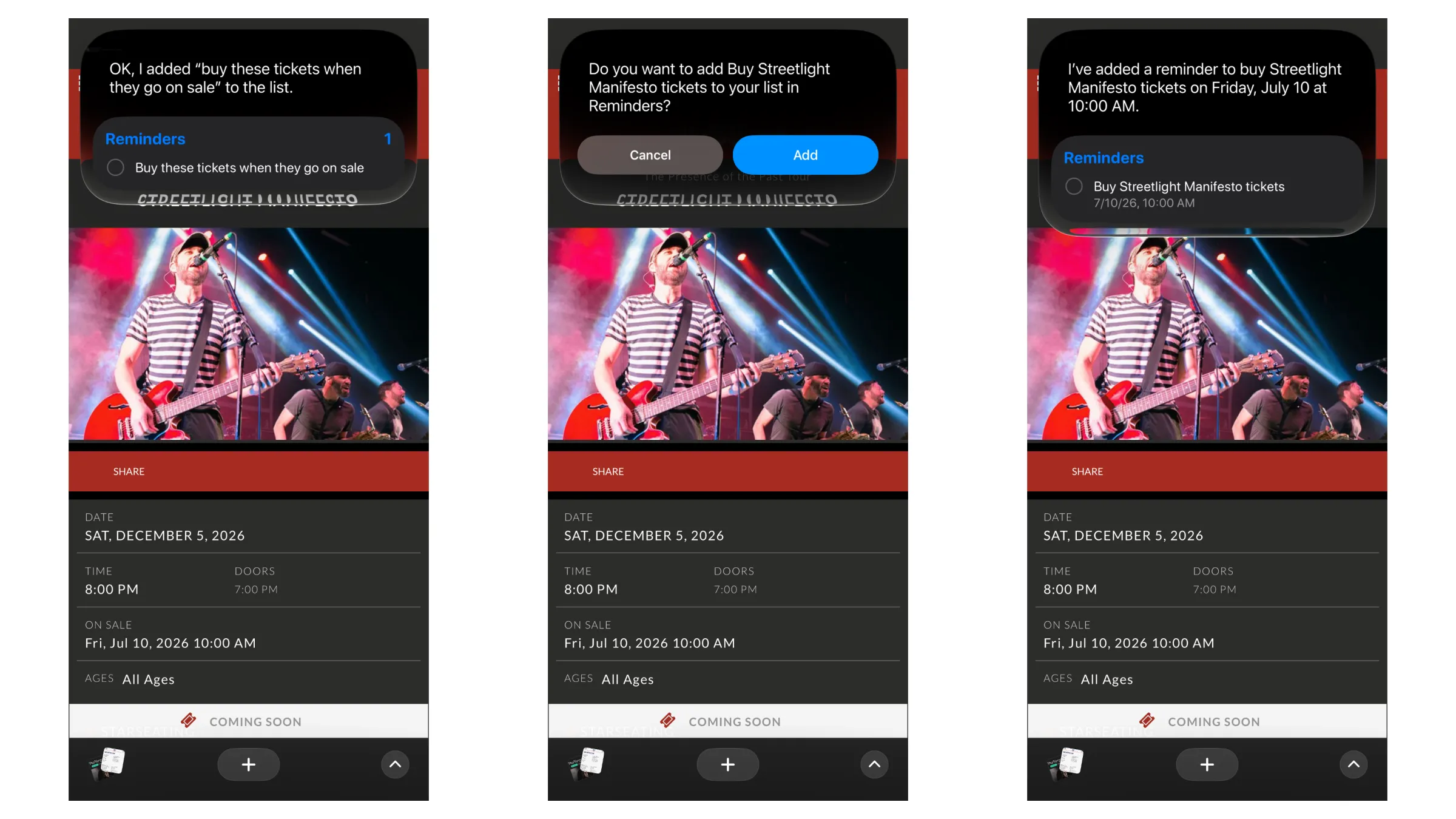
Siri 将你的请求翻译成具体操作的能力似乎仍然是苹果在不断调整的主要领域之一。例如,当我在浏览音乐会页面时,让它“提醒我在票开售时买票”,它只是创建了一个名为“票开售时买票”的提醒。我必须小心地说“在票开售时购买这个的票”,才能触发 Siri 实际查看我的屏幕并在网上搜索票务情况。而且大多数时候,要求 Siri “给我规划路线”没有任何反应,但说“带我去某个地点”就可以。我想随着数据的增加,它的词语关联可能会逐渐改善,但当整个重点是能够用自然语言与计算机交流,而不是依赖关键词时,这可能会很令人沮丧。
目前,如果你在 iOS 27 测试版上的 Siri AI 预览中,只有苹果的应用可以访问 Siri 的新功能。如果你生活在苹果生态系统内,一切都很好。你的数据可能存在于信息、邮件和照片中,当你想要执行操作时,你会向提醒事项和备忘录添加待办事项。我每天使用其中的一些应用,并且当它们协同工作时,比如将邮件中的活动列表添加到日历中,确实像是在看到未来的一个预览。但如果我问 Siri “Daniel 说他什么时候有空玩 Dota?”,Siri 就不会有任何概念,因为我和 Daniel 仅通过 Telegram 消息交流,而系统无法访问该应用。
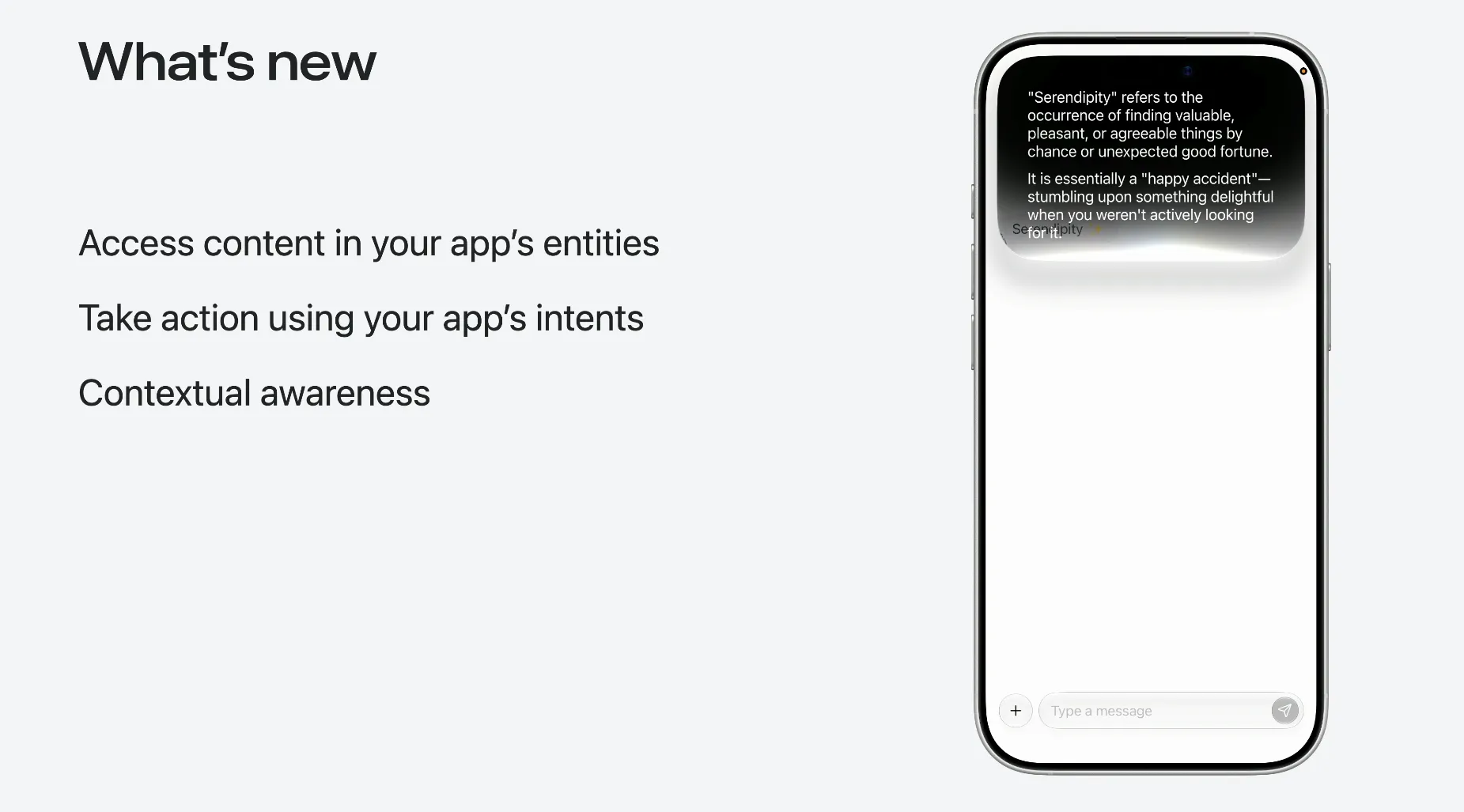
开发者需要为 Siri AI 支持实现的两项主要更新是实体和意图。实体表示应用可以包含的数据类型,如照片、食谱、播放列表或笔记。如果一个应用向 Siri AI 添加实体,Siri 就能准确知道它可以从该应用中提取哪种数据以用于你的个人上下文。相反,意图告诉 Siri 它可以对这些数据执行什么操作,比如播放、保存或删除。应用的实体和意图允许 Siri 控制并提取数据,而 Siri 的语义层则负责理解你的词语。应用的实体和意图使这些语义能够控制并提取其数据。
如果你的数字生活大多发生在 Apple 应用之外,那么让所需的应用与 Siri AI 良好协作将需要一些时间。这在公开测试期间肯定不会发生。开发者现在可以针对 iOS 27 SDK 构建实体和意图,但在 SDK 本身正式发布之前,你作为用户就不太走运;在 iOS 27 的完整版本秋季推出之前,他们实际上无法将 Siri AI 更新推送到他们的应用中。
Apple 很大程度上依赖开发者更新他们的应用以支持新的 Siri,但这并不是我们以前没有见过的情况。实际上,每当 Apple 添加重大新功能时,比如深色模式或 iPad 应用,开发者都需要做一些工作以确保这些功能正常运行。我想不同之处在于,以往的大多数更新直接影响开发者自己应用内的用户体验。这次,Apple 是要求开发者更新他们的应用,以提升 Siri 的体验。
我交谈过的开发者告诉我,虽然他们对这些新功能感到非常兴奋,但更新他们的应用以支持这些功能是一项相当庞大的任务。曾在 Workflow 工作、后被 Apple 收购并成为 Shortcuts 的 Matthew Cassinelli 表示:“开发者的概念性挑战在于,为应用中的每一个界面和功能创建全面支持。但向基于代理的模型过渡允许专业化应用动态呈现相关数据,这使它们对那些可能不会频繁打开特定应用的用户更有用。”
iOS 27 escaped the developer world today with the launch of the first public beta. I’ve been testing the new operating system since early June, looking for quirks and seeing if it can live up to the hype Apple promised in the keynote.
This year’s iOS upgrades are what one might call a Snow Leopard update:https://medium.com/@michaelswengel/macos-27-golden-gate-could-be-apples-next-snow-leopard-if-they-don-t-screw-it-up-c14872a950c8. That means it’s light on new features and instead focused on fixing things that were broken and speeding up processes across the OS. App launches, Photos search results, and AirDrop transfers should all be faster. The Messages app now supports in-line replies and end-to-end encryption for RCS messages. Liquid Glass has gotten more refined, with better legibility around hard edges and text. These are all wonderful updates, particularly for those who have aging iPhones. But by far the biggest and most anticipated change in this update is that Apple finally, actually for real shipped the revamped Siri AI, in the form of an opt-in beta program. And this time, I think Apple might have actually done it. Or at least it finally laid the foundation for a successful version of Siri.
Last week, I was trying to decide if I had time to go to a free concert in the city. The show was four hours long with three acts, and I only really wanted to see one. I couldn’t find the order the bands were performing on the event page, which meant this was a perfect opportunity to pressure-test Siri AI. So I swiped down from the top of the screen and asked, “What order are the bands playing in?” Siri spun its new little wheel for a few seconds, then correctly told me the information I was hoping for: The band I wanted to see was playing last.
It’s practically stopped me from opening my browser for most things
The promise of the new Siri AI is to change the way you use your phone. Before, you went to an app and told the app what you wanted to do (call a car, set a timer, order lunch); now, you say what you want to do first, and Siri AI tries to look through all the apps and information available to it to handle the rest. So when I asked about the concert, Siri looked at what was on the webpage, then searched the web, found the answer, and presented it to me. I didn’t need to jump around browser tabs or look at the band’s Instagram page; it was just there.
In the month I’ve been using Siri AI, it’s surprised me in tons of different ways. On my first day testing the beta during Apple’s dev conference, I was able to ask “Can you add my WWDC briefings to my calendar?” and Siri looked in my email, parsed the data, and added six individual events with correct times to my calendar. I’ll note, it could only add it to my Apple calendar, but I’ll get to why shortly.
These interactions have genuinely altered my brain chemistry a bit. Now, I almost always try to use Siri first, just to see if it can perform the action I need or answer a simple question. It’s practically stopped me from opening my browser for most things, since it’s easier, faster, and more enjoyable to just swipe down from the top of the screen and type a prompt.
Onscreen awareness has probably been the most helpful addition for me. Being able to ask Siri about what’s on my screen saves me a lot of tapping around. When it’s able to take action from that onscreen awareness, like adding an event to my calendar or directing me to an address on my screen, it’s even better.
More often than I’ve expected, Siri is able to do what I ask it to, and when it performs a somewhat complex task, it feels like magic. But when it hits a wall, I’m reminded of why it’s going to take a bit of work to get to the “it just works” universe where Siri not working is the exception, not the norm.
Siri’s ability to translate your request into a specific action seems to be one of the main areas where Apple is still working out kinks. For example, when I asked it to “remind me to buy these tickets when they go on sale” while looking at a concert page, it simply made a reminder called “buy these tickets when they go on sale.” I had to be careful to say “buy tickets to this when they go on sale” to trigger Siri to actually look at my screen and search the web for the ticket availability. And most of the time, asking Siri to “route” me to a location didn’t do anything, but “direct” me to a location did. I imagine its word correlation may improve over time as more data comes in, but when the entire point is being able to talk to a computer in natural language and not rely on keyword speak, it can be frustrating.
Right now, if you’re on the Siri AI preview on the iOS 27 beta, Apple apps are the only ones with access to Siri’s new capabilities. If you live inside Apple’s ecosystem, everything is great. Your data probably exists inside Messages, Mail, and Photos, and when you want to take action, you’re adding to-do items to Reminders and Notes. I use a few of these apps daily, and when they work together, like adding a list of events from my email to my calendar, it really is like a glimpse at the future. But if I ask Siri “When did Daniel say he was free to play Dota ?” then Siri won’t have any idea, because Daniel and I only message each other through Telegram, which the system doesn’t have access to.
The two main updates developers need to implement for Siri AI support are entities and intents. Entities represent the type of data an app can contain, like a photo, recipe, playlist, or note. If an app adds entities to Siri AI, Siri knows exactly what type of data it can pull from that app to use for your personal context. Conversely, an intent tells Siri what it can actually do with that data, like play, save, or delete. App entities and intents allow Siri to control and pull data from them, and Siri’s semantic layer handles the understanding of your words. The app’s entities and intents allow those semantics to control and pull data from them.
And if your digital life exists mostly outside of Apple apps, it will take time for the apps you need to play well with Siri AI. It definitely won’t happen during the public beta. Developers can now build entities and intents against the iOS 27 SDK, but until the SDK itself is out of beta, you, as a user, are out of luck; they can’t actually push Siri AI updates to their apps until the full version of iOS 27 is available in the fall.
Apple is relying a lot on developers to update their apps to support the new Siri, but it’s not like we haven’t seen this before. Practically every time Apple has added a significant new feature, like Dark Mode or iPad apps, developers have had to do work to get them working properly. The difference, I imagine, is that most of the previous updates have directly affected the user experience within the developer’s own app. This time, Apple is asking developers to update their apps to improve the Siri experience.
Developers I’ve talked to have told me that while they’re super excited about these new capabilities, updating their apps to support them is a pretty massive undertaking. “The conceptual challenge for developers is creating comprehensive support for every screen and function within an app,” says Matthew Cassinelli, who worked at Workflow, the company that would be acquired by Apple and become Shortcuts. “But the transition to agent-based models allows specialized apps to surface relevant data dynamically, which makes them more useful to users who otherwise might not open those specific applications frequently.”
An example of this is the LookBack: Contacts History:https://apps.apple.com/us/app/lookback-contacts-history/id6762175300 app. The app shows you who you most recently added to your phone contacts, and if you forget to open it but ask Siri “Who did I meet at the conference last week?” it can use the app to surface the information.
I can buy that argument that Siri will help surface smaller apps that users forget to open as often when it comes to smaller developers, who don’t make the five or six apps most people use every single day. But the bigger question on my mind is whether or not players like Google are interested in making Siri more capable. Google makes most of its revenue from surfacing ads, and if instead of making you open Gmail to find the information you’re looking for, Siri could simply surface that information at the top of your screen, Google loses out on that revenue. This said, Google is practically doing the exact same thing with AI overviews, so it’s pretty obvious that it’s been preparing for a world where AdSense revenue isn’t its main revenue source.
The primary incentive driver I can see for Google adopting full Siri AI support is consumer choice. If one email app supports Siri AI to its full extent and Gmail doesn’t, I’m more likely to use the other app. I want Siri to keep performing these experiences, pulling my personal context and performing actions for me. If I start running into roadblocks for what an app is able to do, I might start looking for another one. Whether Google’s own stronghold is powerful enough to keep most people around is another question.
This all remains a work in progress. Not only is this a beta OS, but a beta Siri. And it’s only a partial version of the full experience we’re being promised down the road. It’s impressive, but what truly matters still comes next. Developers need to add support for Siri AI to live up to its potential. And Siri AI needs to correctly route and research your requests far more often than it gets tripped up. So far, I’ve been surprised by how much it can do.


 扫码直达文章详情