将 base64 编码的音频发送到 POST /api/v1/audio/transcriptions,并提供 model 和 input_audio 对象(包括 data 和 format)。响应是 JSON,包含 text 字符串(转录文本)和 usage 对象(秒数、tokens 和费用)。它使用与 Chat Completions 相同的 Bearer API Key 和认证。
You’ve got a 40-minute sales call recording, a folder of voice memos, or a user holding down a mic button, and you need a text transcript. The usual approach is to stand up a Whisper server or add a second provider SDK just for speech-to-text, on top of whatever already handles your chat traffic. On OpenRouter you can send the audio to POST /api/v1/audio/transcriptions instead and get back JSON with the transcribed text and a usage object, using the same API key and auth as Chat Completions.
You don’t need a new SDK or a separate service. Because transcription runs on the same platform as your chat traffic, a model hosted by several providers is load-balanced across them automatically instead of being pinned to a single vendor.
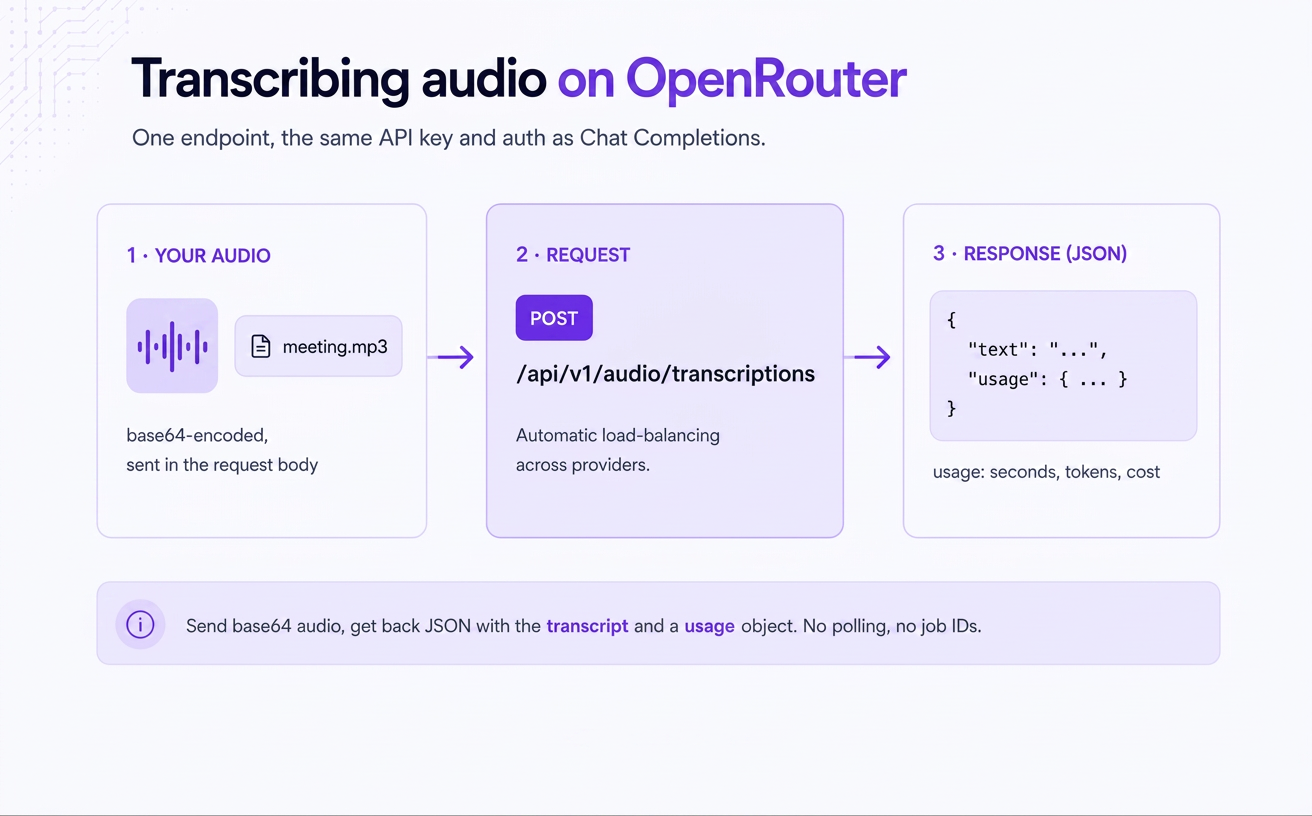
Send base64-encoded audio to POST /api/v1/audio/transcriptions and read the text field off the JSON response. You pass your OpenRouter API key as a Bearer token exactly as you do on a chat call, set a model, and hand it the audio.
The response is JSON with a text string that holds the transcript and a usage object that reports the audio duration in seconds, the token counts, and the dollar cost of the request. You make one request, and the transcript comes back in the response body, so there’s no polling and no job ID to track.
The request body carries a model and an input_audio object. Inside input_audio you put the file as base64 data and a format string. Optionally, you add a language hint, a temperature, and a provider block. Here it is end-to-end:
You can pick from two families of models. Whisper-class models like openai/whisper-1 :https://openrouter.ai/docs/guides/overview/multimodal/stt are priced by duration, per second of audio, while newer speech-to-text models are priced per token. Which one fits depends on your accuracy bar, your language mix, and your budget.
STT model IDs don’t show up in the default /api/v1/models catalog. That’s expected, because transcription is an output modality you filter for.
That returns the speech-to-text models with their current per-model pricing. The same list lives in the Speech-to-Text collection:https://openrouter.ai/collections/speech-to-text-models if you’d rather read it as a page, and the model catalog:https://openrouter.ai/models carries live per-model rates.
If you want to try a model before you wire it up, the OpenRouter Playground:https://openrouter.ai/playground transcribes an uploaded file in-browser.
The whole flow takes three steps. You base64-encode the file, POST it with a model and a format, and read text and usage off the response. The data field takes raw base64 bytes, not a data: URI, so don’t prefix it with data:audio/mp3;base64, . The format field is required, and it tells the upstream model how to decode those bytes.
The endpoint also accepts OpenAI-style multipart/form-data uploads ( file plus model ), capped at 25 MB. If you already have a client built for OpenAI’s /v1/audio/transcriptions , you can point its base URL at https://openrouter.ai/api/v1 and it works unchanged. Files bigger than 25 MB go through the base64 JSON path.
A language hint is optional. If you leave it out, the model detects the language; setting it removes some ambiguity on short or noisy clips. Some providers accept their own extras through provider . Groq, for instance, takes a prompt for expected vocabulary via provider.options.groq.prompt , which helps with proper nouns and jargon the model would otherwise mangle.
The response is JSON with a text string and a usage object. The usage object is what lets you meter spend per request instead of estimating it.
That cost value is an example from our docs, not a price quote; your actual cost depends on the model and the audio length. The usage object reports seconds (audio duration), the token counts, and cost in dollars. The response also carries an X-Generation-Id header you can log to track or debug a specific request later.
Use /audio/transcriptions when you want audio turned into text, and audio input on chat when you want a model to reason about the audio.
The transcription endpoint fits meeting notes, voice commands, captioning, and searchable archives of calls or podcasts. If you want sentiment on a support call, a Q&A about what was said, or audio mixed with other modalities in one prompt, use the input_audio content type on /chat/completions . Turning text into speech is a third, separate endpoint.
For both audio analysis and text-to-speech, see the audio APIs announcement:https://openrouter.ai/blog/announcements/announcing-audio-apis.
Transcription uses the same routing layer as chat. When a model is hosted by more than one provider, we distribute your requests across them, load-balanced by price, so you aren’t pinned to a single vendor. What transcription doesn’t expose today is per-request routing control. The order , only , allow_fallbacks , data_collection , and sort fields you’d set on a chat call are not applied on /api/v1/audio/transcriptions . The provider block on this endpoint carries provider-specific options instead:
That request passes Groq a vocabulary hint for proper nouns it would otherwise mangle. The options are keyed by provider slug, and only the matched provider’s options are forwarded. If you need to pin a specific provider or enforce a per-request data policy on a transcription, that control isn’t available on this endpoint yet. The full provider object is documented in the provider routing docs:https://openrouter.ai/docs/guides/routing/provider-selection.
OpenRouter doesn’t mark up provider pricing:https://openrouter.ai/pricing, so the catalog rate is what you pay, and Zero Completion Insurance means a transcription that fails isn’t billed. If you already have a provider agreement, BYOK:https://openrouter.ai/docs/guides/overview/auth/byok lets you route through your own provider key and pay only our platform fee instead of the per-usage model cost, with the fee waived for the first 1M requests a month on pay-as-you-go.
Four constraints shape how you structure a transcription call:
Because the timeout caps processing time rather than audio length, a clip’s duration alone doesn’t tell you whether it will fit. A recording that runs for hours, like an overnight game session, needs the chunking treatment; a single call won’t cover it.
For captions, the default response is text plus usage with no timing. Set response_format to verbose_json and you get segment-level timestamps, plus word-level ones if you pass timestamp_granularities: ["word"] . That works on OpenAI-compatible providers (OpenAI, Groq, Together); other providers reject it with a 400. There’s no built-in .srt / .vtt output, so you build the subtitle file from the timestamps yourself.
You pay the model’s catalog rate with no markup from us, and the usage.cost field tells you the exact figure per request. Whisper-class models charge per second of audio, and newer models charge per token.
Rates change, so we keep the live figure on each model’s page in the catalog:https://openrouter.ai/models rather than printing one here. Reading usage.cost off the response tells you what each request actually cost. STT models are paid, so API transcription draws on your credit balance.
To get started, confirm a model fits your audio in the Playground:https://openrouter.ai/playground, wire up the call, and read usage.cost per request to meter spend from day one.
Send base64-encoded audio to POST /api/v1/audio/transcriptions with a model and an input_audio object ( data plus format ). The response is JSON with a text string (the transcript) and a usage object (seconds, tokens, and cost). It uses the same Bearer API key and auth as Chat Completions.
Yes. Whisper-class models are available for transcription, and openai/whisper-1 is the slug to use. STT model IDs aren’t in the default /api/v1/models list, so you discover them by filtering with ?output_modalities=transcription or browsing the Speech-to-Text collection:https://openrouter.ai/collections/speech-to-text-models. Whisper is duration-priced, per second of audio; newer STT models price per token instead.
The common set is wav , mp3 , flac , m4a , ogg , webm , and aac , passed in the required input_audio.format field. Support varies by model and provider, so not every model accepts every format. wav is the safest default for broad compatibility; compressed formats like mp3 give smaller, faster payloads.
Timestamps, yes. Set response_format to verbose_json to get segment-level timestamps, and add timestamp_granularities: ["word"] for word-level timestamps in a words array. That works on OpenAI-compatible providers (OpenAI, Groq, Together); other providers reject it with a 400. SRT/VTT output isn’t supported, so build subtitle files from the timestamps yourself.
The practical limit is the roughly 60-second upstream processing timeout, not a fixed audio-length cap. Short and medium clips return in one call. For long recordings, split the audio into segments, transcribe each, and stitch the text together.
You pay the model’s catalog rate with no markup. Whisper-class models price per second of audio; newer STT models price per token. The usage.cost field in each response reports the exact dollar cost of that request.
情报判断
Aioga 编辑摘要
OpenRouter 新增音频转写端点 POST /api/v1/audio/transcriptions。用户可沿用 Chat Completions 的 API key 与认证方式,提交 base64 编码音频,并在单次响应中获得转写文本及用量对象。

 扫码直达文章详情