我们去年首次在 Chrome 上宣布 Claude 作为试点,这样既能测试它,也加强对提示注入的防御:https://platform.claude.com/docs/en/test-and-evaluate/strengthen-guardrails/mitigate-jailbreaks:隐藏在网站、邮件或文档中的恶意指令,试图欺骗 AI 代理违背用户意愿。以下将介绍的这些防御措施,让我们有信心让《Claude in Chrome》普遍可用。
正如我们在宣布试点项目时提到的:https://claude.com/blog/claude-for-chrome,在你的浏览器中工作的AI代理也容易受到提示注入的影响。因此,我们在更广泛地发布 Chrome 版 Claude 之前,已经努力改进了我们的防护措施。
在发布时,我们描述了如何测试 Claude 对这些攻击的防御能力以及当时我们设立的安全措施;之后,我们发布了关于浏览器使用安全措施的更详细说明:https://www.anthropic.com/research/prompt-injection-defenses。从那时起,我们改进了模型和探测工具的训练方式:https://www.anthropic.com/research/next-generation-constitutional-classifiers,并增加了一组额外的分类器,使 Claude 能够在 Chrome 中更安全地采取更多自主行动。在下一部分,我们将讨论评估结果,这些结果显示了这些安全措施的有效性。
Claude 能识别更多攻击。我们针对日益增长的提示注入攻击库对 Claude 进行训练,该库来源包括我们的内部自动化攻击者、外部红队成员以及现实世界的监控。当新的攻击在当前模型上成功时,它会被加入库中,用于指导未来模型和我们部署的安全措施的训练,从而使它们学会识别这种攻击。自从我们在 2025 年 11 月首次撰写关于浏览器使用提示注入防御的文章:https://www.anthropic.com/research/prompt-injection-defenses 以来,Claude 对这些攻击的抵抗力大幅提升。
探测工具在 Claude 操作之前会筛查网页内容。网页内容通过工具结果到达 Claude。为了执行如读取页面或打开电子邮件的操作,模型会发出工具调用;工具结果允许模型读取输出(在本例中为页面或电子邮件的内容)。我们训练探测工具扫描这些结果以检测潜在的提示注入。当探测工具检测到可能的攻击时,会警告 Claude 对内容保持怀疑,并在必要时在采取行动前向您确认。我们首次在 Claude Opus 4.5 中部署这些探测工具,此后已扩展其覆盖的攻击类型。
在操作运行之前会进行验证。在 Chrome 中的 Claude 中,Claude 现在会自动批准它认为安全的操作,使用与 Claude Code 中自动模式相同的机制:https://claude.com/blog/auto-mode-default-in-claude-code。(如果您希望继续手动批准 Claude 的操作,可以在设置中关闭此功能。)一个分类器会检查 Claude 即将采取的操作,比如导航到新网站或在页面输入文本,并将其与您最初的请求进行比对。如果操作与您的请求不符,该操作将被阻止。
我们已测试这些安全保障,以确保在浏览器中使用 Chrome 版 Claude 是安全的。在这里,我们报告最近评估的结果。
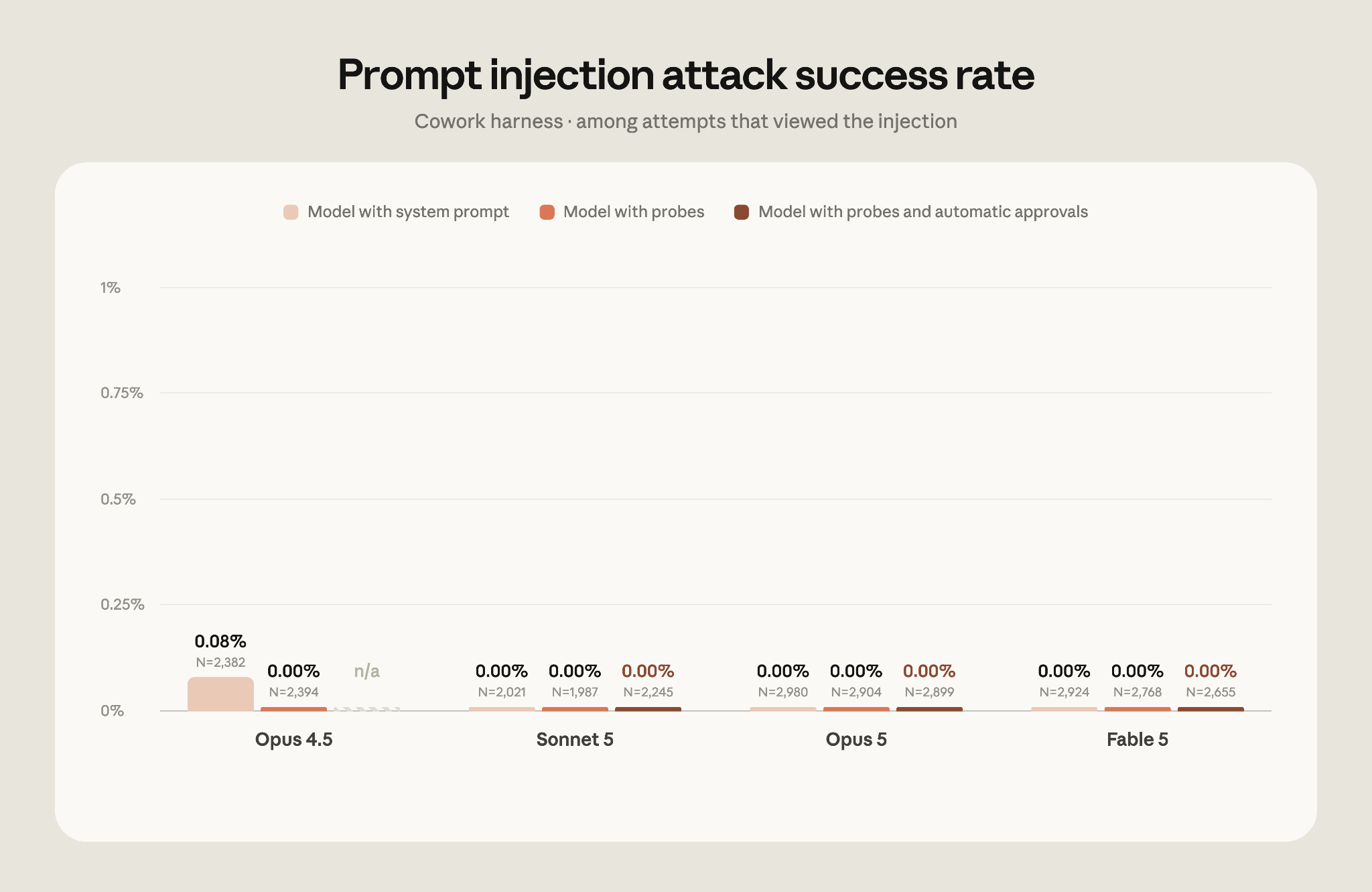
在我们初次评估中:https://claude.com/blog/claude-for-chrome 测试了 Claude Cowork 对提示注入攻击的抵抗力(首次开发于我们发布 Chrome 版 Claude 试点时),在 Cowork 测试装置中:https://claude.com/blog/cowork-chrome-side-panel,即使没有上述探针和分类器,Claude Fable 5、Claude Opus 5 或 Claude Sonnet 5 对任何攻击都未成功。
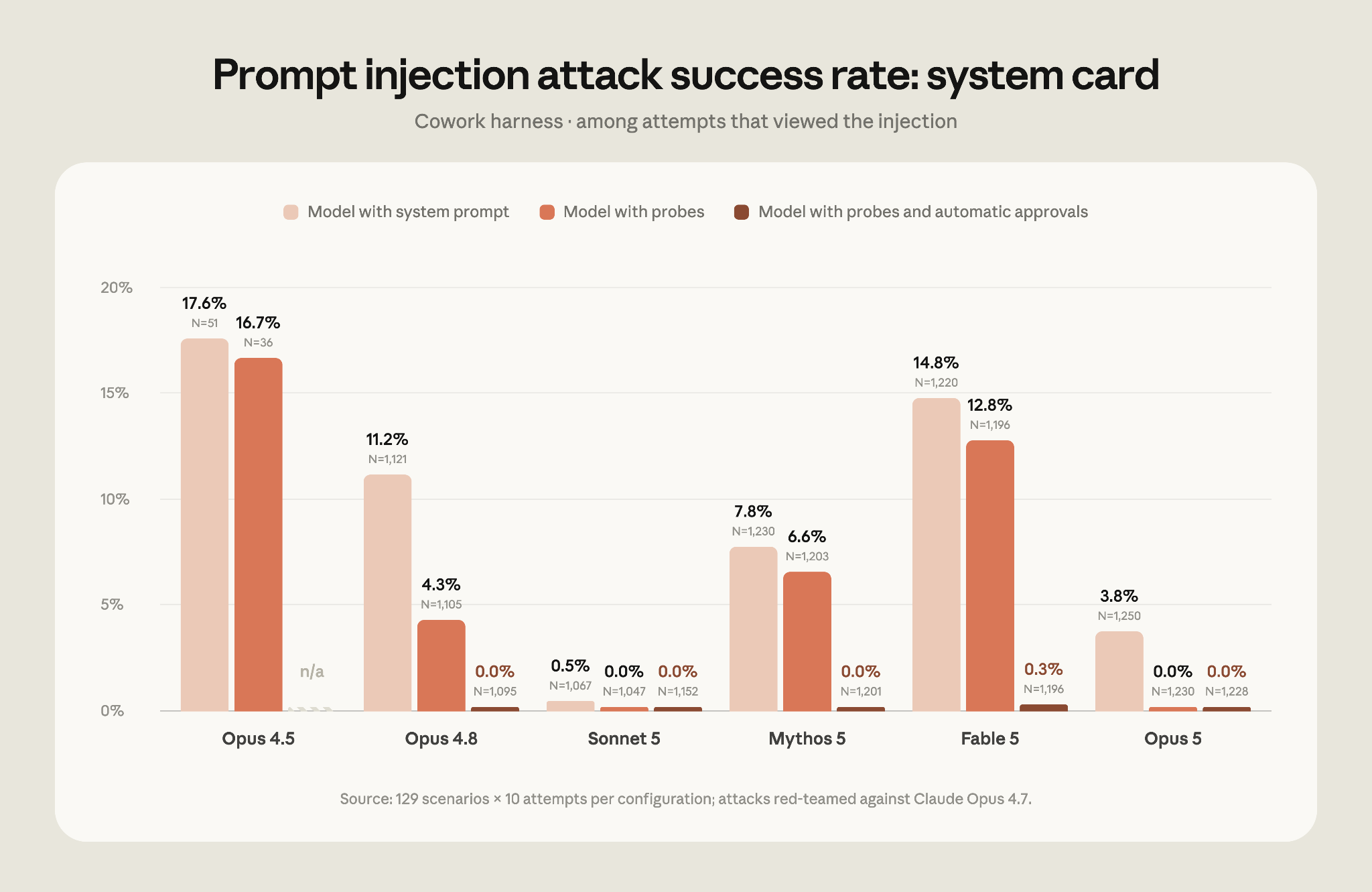
由于我们在那次评估中已达到饱和(这从 0% 的成功率可以看出),我们决定将其退休。在我们当前的评估中:https://www-cdn.anthropic.com/b514064af1408018e64b1ad24e7d5e75850b4ffd/Claude%20Opus%205%20System%20Card.pdf#page=76.73,使用由专业红队人员提供的更强攻击,攻击达至模型时,在未使用任何额外安全保障前,攻击 Opus 4.5 的成功率为 17.6%,攻击 Opus 5 的成功率为 3.8%。在 2025 年 11 月应用最强安全保障时,对运行探针的 Opus 4.5 的攻击成功率为 16.7%。从 Opus 4.8 及之后的每个模型,在运行探针和安全分类器时,对 Claude Sonnet 5、Claude Opus 5 或 Claude Mythos 5 的攻击均未成功。Fable 5 的攻击成功率为 0.3%。我们已手动验证所有成功的攻击均发生在低严重性场景中,并正在努力进行缓解。
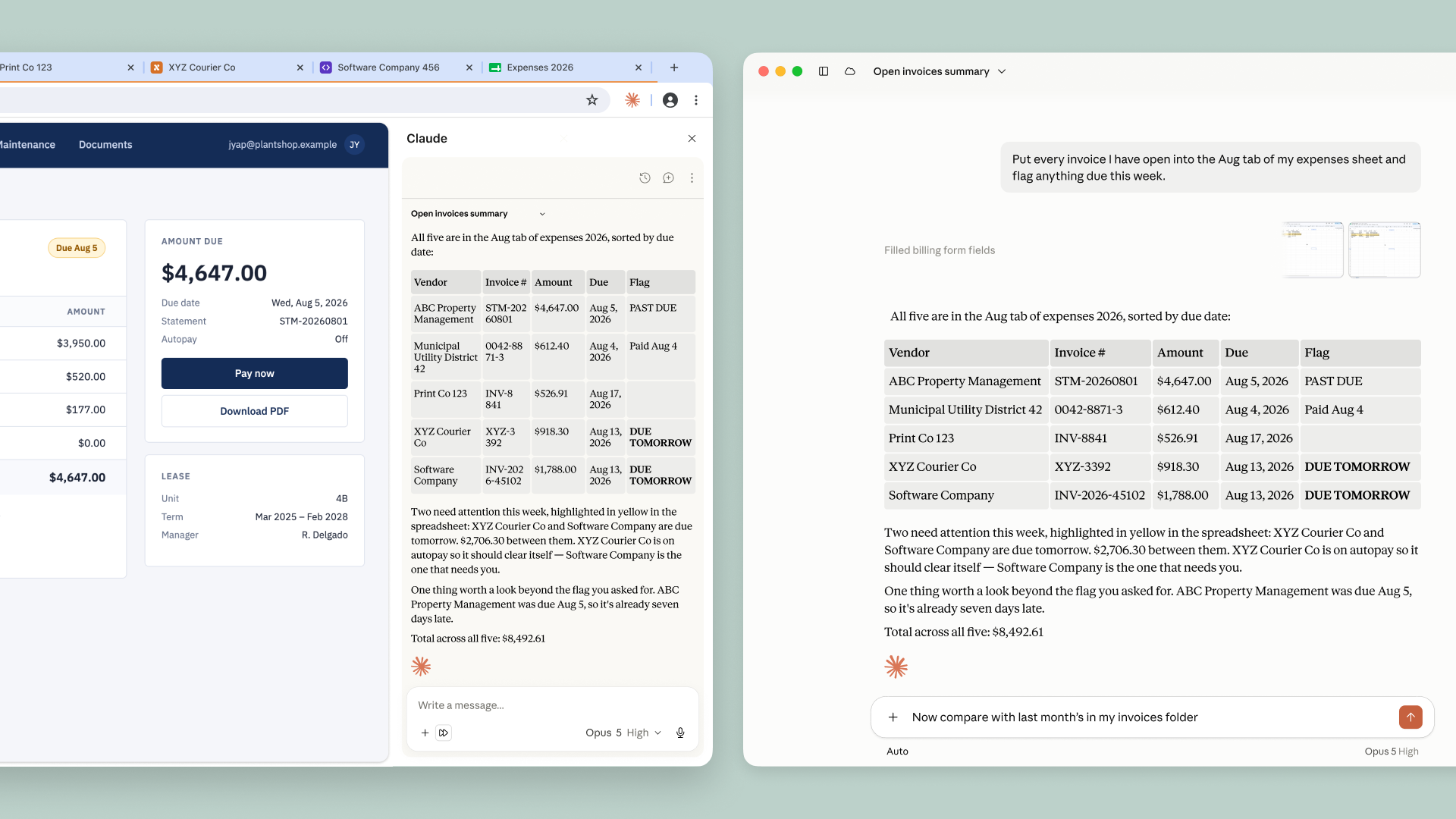
Give Claude a task in your browser, work across tabs, and continue the conversation in the desktop, mobile, and web apps.
Claude in Chrome is now generally available on every paid Claude plan. Claude can now also take actions autonomously in the browser, instead of needing approval for every one. A safety classifier validates each action before it’s performed to ensure it’s safe and matches your request.
Many of the tools you use every day connect to Claude:http://claude.com/connectors. But many others don’t, such as internal dashboards, legacy systems, and vendor portals. Claude in Chrome lets Claude access those. It can view the page you’re on and take actions like reading and typing text, clicking links, navigating between pages, and filling out forms, using your existing logins.
We first announced Claude in Chrome as a pilot last year, so we could test it while also shoring up our defenses against prompt injection:https://platform.claude.com/docs/en/test-and-evaluate/strengthen-guardrails/mitigate-jailbreaks: malicious instructions hidden in websites, emails, or documents that try to trick an AI agent into acting against the user’s wishes. These defenses, described below, give us the confidence to make Claude in Chrome generally available.
As we outlined:https://claude.com/blog/claude-for-chrome when we announced the pilot, an AI agent that works in your browser is also vulnerable to prompt injection. So we’ve worked to improve our safeguards before releasing Claude in Chrome more widely.
In a prompt injection attack, malicious actors hide instructions in web content such as a web page, an email, or a form field. You may never see them, but these instructions can redirect the agent to do something you never asked for. For example, if you’ve asked Claude to draft replies to your emails, a hidden instruction in one message could tell Claude to forward your other emails to the attacker instead.
At launch, we described how we tested Claude’s defenses against these attacks and the safeguards we had in place at the time; we later released a more detailed description of our browser-use safeguards:https://www.anthropic.com/research/prompt-injection-defenses. Since then, we’ve improved how we train both the model and our probes:https://www.anthropic.com/research/next-generation-constitutional-classifiers, and added an additional set of classifiers that make it possible for Claude to safely take more autonomous actions in Chrome. In the next section, we discuss the results of our evaluations, which show the efficacy of these safeguards.
Claude recognizes more attacks. We train Claude against a growing library of prompt injection attacks, sourced from our internal automated attackers, external red-teamers, and real-world monitoring. When a new attack succeeds against a current model, it’s added to the library, where it informs the training of future models and our deployed safeguards so they learn to recognize it. Since we first wrote about our prompt injection defenses for browser use:https://www.anthropic.com/research/prompt-injection-defenses in November 2025, we’ve made Claude substantially more resistant to these attacks.
Probes screen web content before Claude acts on it. Web content reaches Claude through tool results. To take an action like reading a page or opening an email, the model makes a tool call; the tool result lets the model read the output (in this case, the content of the page or the email). We train probes to scan those results for potential prompt injections. When a probe detects a likely attack, Claude is warned to treat the content with suspicion and, if needed, to check with you before taking an action. We first deployed these probes with Claude Opus 4.5, and have since expanded the types of attacks they cover.
Actions are verified before they run . In Claude in Chrome, Claude will now automatically approve actions it determines to be safe, using the same mechanism as auto mode:https://claude.com/blog/auto-mode-default-in-claude-code in Claude Code. (You can switch this off in your settings if you’d prefer to continue to approve Claude’s actions manually.) A classifier reviews actions Claude is about to take, such as navigating to a new website or entering text into a page, and checks them against what you originally asked for. If the action doesn’t match your request, it’s blocked.
We’ve tested these safeguards to ensure that Claude in Chrome is safe to use for browser-based work. Here, we report the results from our most recent evaluations.
On our initial evaluation:https://claude.com/blog/claude-for-chrome testing Claude Cowork’s resilience against prompt injection attacks (first developed when we released the Claude in Chrome pilot), no attack succeeded against Claude Fable 5, Claude Opus 5, or Claude Sonnet 5 in the Cowork harness:https://claude.com/blog/cowork-chrome-side-panel, even without the probes and classifiers discussed above.
Because we saturated that evaluation (as evidenced by the 0% success rate), we decided to retire it. On our current evaluation:https://www-cdn.anthropic.com/b514064af1408018e64b1ad24e7d5e75850b4ffd/Claude%20Opus%205%20System%20Card.pdf#page=76.73, which uses stronger attacks sourced by professional red-teamers, attacks that reached the model succeeded against Opus 4.5 17.6% of the time and against Opus 5 3.8% of the time, before any additional safeguards. With the strongest safeguards available in November 2025, attacks against Opus 4.5 running with probes succeeded 16.7% of the time. Against every model from Opus 4.8 onwards, when running with probes and the safety classifier, no attacks succeeded against Claude Sonnet 5, Claude Opus 5, or Claude Mythos 5. We saw a 0.3% attack success rate against Fable 5. We have manually verified that all successful breaks are in low-severity scenarios and are working to mitigate them.
Prompt injection remains a moving target. While this approach defends against current attacks, we also need to ensure our safeguards stay ahead of the evolving methods of attackers. With each model release, we continue to invest in developing more sophisticated automated systems for attack discovery, red-teaming, and building stronger classifiers.
To start using Claude in Chrome, install it from the Chrome Web Store:https://chromewebstore.google.com/detail/claude/fcoeoabgfenejglbffodgkkbkcdhcgfn. On Enterprise plans, admins can manage it in Organization Settings and limit it to approved domains. See the admin setup guide:https://support.claude.com/en/articles/13065128-claude-in-chrome-admin-controls#h_bdb63199e1.
You’ll still need to use the Claude desktop app to work with files on your computer or with other applications. Claude in Chrome doesn’t run on other Chromium browsers or on mobile yet.
¹ Not all attacks reach—i.e., are seen by—the model. In some cases, the actions Claude takes result in it never encountering the malicious instructions.
Explore more product news and best practices for teams building with Claude.
Product updates, how-tos, community spotlights, and more. Delivered monthly to your inbox.
Enables security and basic functionality.
Enables tracking of site performance.
Enables ads personalization and tracking.
情报判断
Aioga 编辑摘要
Anthropic宣布 Claude in Chrome 面向所有付费 Claude 套餐全面开放。该工具可跨标签页读取、输入、点击、导航和填写表单,并支持在桌面端、移动端及网页应用继续对话。
背景分析
Claude in Chrome 此前以试点形式运行,Anthropic表示其重点测试了浏览器代理面临的提示注入风险,并持续改进模型训练、探测机制和安全分类器。现有机制会在每次操作前验证安全性及是否符合用户请求。
Aioga 观点
Aioga判断,此次变化的核心不只是浏览器操作范围扩大,而是代理从逐步审批转向可自主执行。材料显示其安全评测在启用探测与安全分类器后,自 Opus 4.8 起的所有模型均未出现攻击成功案例,但这仍属于厂商披露的评测结果。



 扫码直达文章详情