服务器工具默认启用。工作区管理员可以在工作区的服务器工具页面关闭任何工具,每个工具都有一个显示“可用”或“阻止”的开关。该设置适用于工作区的所有请求,无论是通过 API 密钥、聊天室还是预设。
Shell、Bash、Files API 和容器处于测试版,并已可用。测试期间 API 可能会发生变化。如果某些功能未按预期工作,请在我们的 Discord #feedback 上告诉我们:https://discord.gg/fVyRaUDgxW
Introducing the openrouter:shell server tool and the Files API: any model on OpenRouter can now run commands in a hosted Linux container. The Files API enables upload of files for models to work with and the download of outputs. Both are available today in beta.
Shell and Files join our growing list of server tools:https://openrouter.ai/docs/guides/features/server-tools, enabling you to create server-side agentic behaviors you can swap across models. For example, you can ask any model to search the web, write a script that turns the results into a chart, and run it entirely with server-side compute.
Try it in the chatroom:https://openrouter.ai/chat by turning on the shell tool, and read the shell:https://openrouter.ai/docs/guides/features/server-tools/shell, containers:https://openrouter.ai/docs/guides/features/containers, and Files API:https://openrouter.ai/docs/guides/features/files-api guides for the API details. Sandbox time costs $0.0001 per second, is billed as part of the request, and includes Files API usage. Details are in the Pricing:#pricing section.
To use openrouter:shell , send it in the tools array for any model that supports tool calling. This lets the model decide when it needs a terminal and when to invoke it:
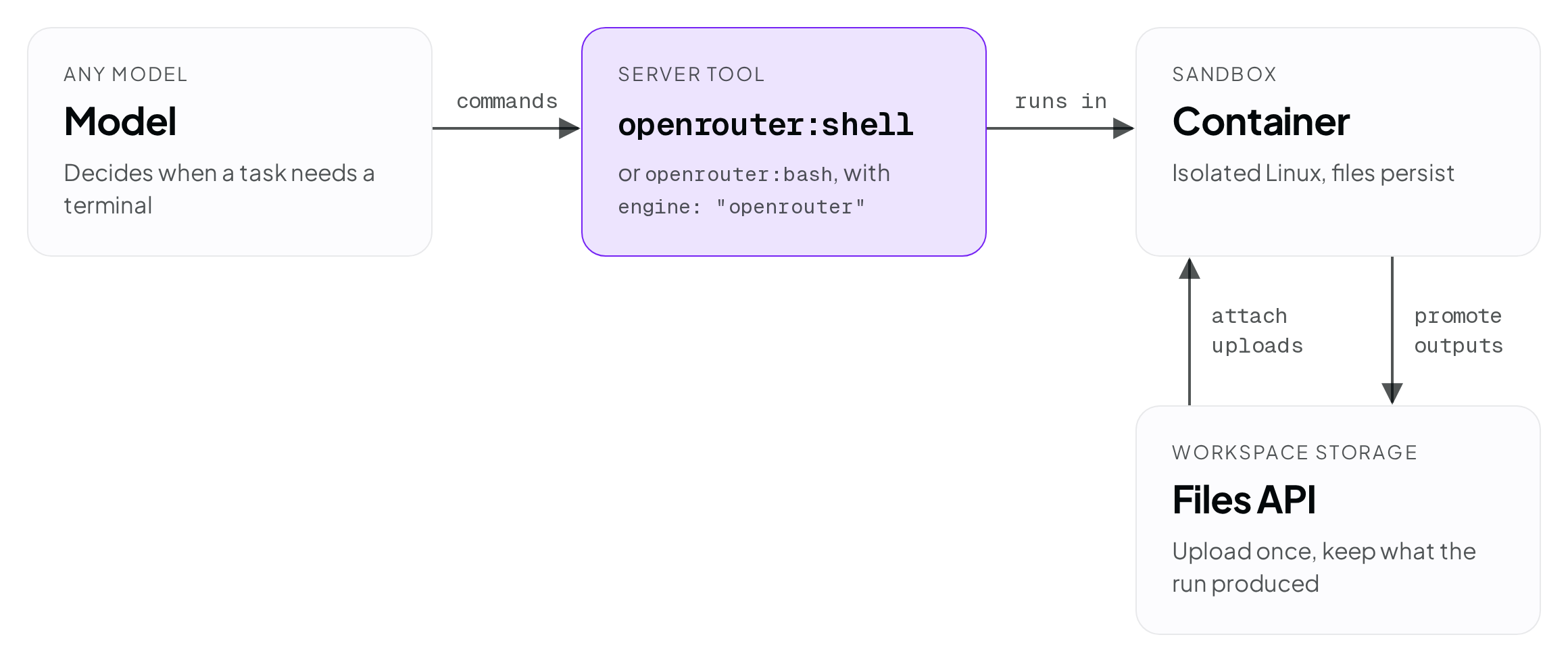
We’ve introduced three capabilities that work together to provide server-side command execution and files:
When the model calls the tool, it emits a batch of commands. They are executed within the container, each in its own invocation, and return stdout , stderr , and an exit code to the model. This allows the model to react to the output it receives. For example, if it writes a script to parse your CSV and the parse fails, it can see the problem on stderr and fix the script before answering.
The generation details view on the Logs page:https://openrouter.ai/logs shows the request as a timeline. The model turns and the sandbox run appear as separate rows, each with its own duration and cost:
We shipped two different tools for sandbox command execution to provide compatibility with both the OpenAI and Anthropic spec. The most notable difference is that the bash tool’s default is to ask your app to run the command locally. On OpenRouter, you can change the engine to override this behavior and execute on the server.
engine: "openrouter" on either tool guarantees server-side execution in the OpenRouter sandbox with any model.
A container is an isolated Linux environment on OpenRouter’s infrastructure scoped to your workspace. Containers can be configured for the needs of your app:
The Files API:https://openrouter.ai/docs/guides/features/files-api is workspace storage that sits alongside the container. You upload inputs there for shell to work on, and you move shell’s outputs back into it.
Upload the input with POST /api/v1/files :https://openrouter.ai/docs/api/api-reference/files/upload-a-file. The response includes a file id that starts with or_file_ :
Then attach it by id in the tool’s environment :
Attached files appear in the home directory as writable copies, up to 20 per container. Each copy is named with the last 8 characters of the file id plus the original filename, so data/sales.csv attached with the id above becomes ~/NR6q4V8w-sales.csv . Changes inside the container won’t affect the original workspace file. A container starts with only the files you attach to it.
Each shell result lists the files the command touched, with a cfile_ id for each. Download the files with the container file content endpoint:https://openrouter.ai/docs/api/api-reference/containers/download-container-file-content:
Container files are kept for 30 days. To keep one for the long term, promote it:https://openrouter.ai/docs/api/api-reference/containers/promote-a-container-file-into-workspace-documents:
Promoting copies the container file into your workspace and returns a new or_file_ id, which you can attach to a later run the same way as an upload. Unlike uploads, promoted files are downloadable through the Files API.
You can view all of your files on the workspace files page:https://openrouter.ai/workspaces/default/files. Files you upload directly cannot be downloaded, but files promoted from a container can.
Shell is one of many server tools:https://openrouter.ai/docs/guides/features/server-tools we offer and are powerful when working together. Here the model uses web search to find material and shell to turn it into a file:
The resulting ~/out/releases.md shows up in the shell result’s file list, and you download it with the container file content endpoint above.
This combination also matters if you don’t want to give the container network access. Web search runs outside the container, so the model can pull in web content and pass it into its commands while the container stays on the default network policy with no internet access of its own.
In the chatroom:https://openrouter.ai/chat, the same combination works with the shell and web search switches turned on. Files the run creates appear in the conversation as downloads.
Shell and Bash usage is billed by sandbox time. The price is $0.0001 per active second , metered from the moment a request first runs a sandbox command until the last sandbox command. Time a container spends idle after the request ends is not billed.
We bill a minimum of 30 seconds when a request starts a cold container, either a new one or one that has gone idle. If an agent makes several requests to the same container in succession, only the first pays the minimum.
Billing per request makes it easy to find the cost to run a specific request. A request’s cost is its token cost plus its sandbox time, and the sandbox time appears as its own row in the request’s timeline on the Logs page.
Files API usage has no separate charge, but total storage is limited to 10 GiB.
Server tools are enabled by default. A workspace admin can turn any of them off from the workspace’s Server Tools page, where each tool has a switch showing Available or Blocked. The setting applies to every request the workspace makes, whether through API keys, the chatroom, or presets.
Shell, Bash, the Files API, and containers are in beta and available now. The API may change during the beta. If something doesn’t work the way you expect, let us know in #feedback:https://discord.gg/fVyRaUDgxW on our Discord.
情报判断
Aioga 编辑摘要
OpenRouter 发布 openrouter:shell 服务端工具与 Files API,现已进入 beta 阶段。支持工具调用的模型可在托管 Linux 容器中运行命令,Files API 支持上传文件并下载处理结果。
背景分析
该能力属于 OpenRouter 的服务端工具体系。模型调用 shell 后,命令会在容器中执行,并向模型返回标准输出、错误输出和退出代码;相关沙箱运行时间与 Files API 使用费用计入请求账单。


 扫码直达文章详情