我建议你暂时不要运行这些提示,而是观察你可以使用哪些自然语言提示,通过这些 Google Agent 技能来操作 Google 云平台。
1. 触发 google-cloud-recipe-onboarding
提示:“我想从零开始设置我的第一个 Google 云项目。”
说明:该代理将指导你完成项目创建、账单关联以及初始 IAM 设置。
2. 触发 google-cloud-recipe-auth
提示:“我如何将本地环境认证到 Google 云?”
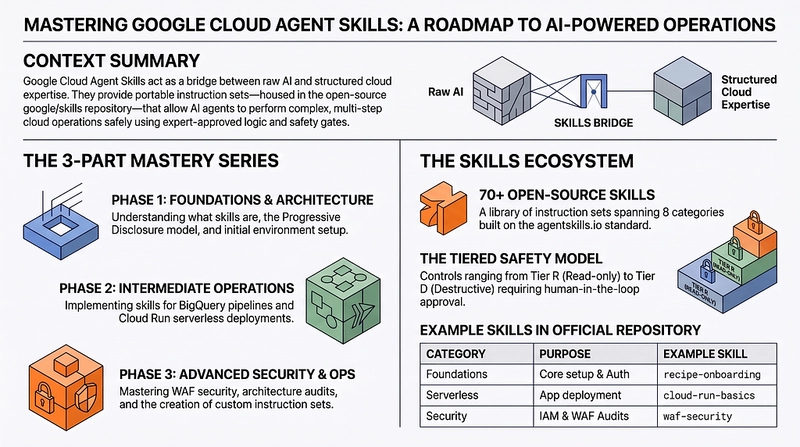
Welcome to the definitive guide on Google Cloud Agent Skills. As the landscape of software engineering evolves, AI coding agents are increasingly being given tasks to becoming autonomous and capable of executing complex, multi-step cloud operations.
The goal of this series is to take a look at the current set of official skills being made available by Google Cloud, right from the basics and applying it to a few use cases like performing security audits, deploy serverless applications, or optimize BigQuery pipelines.
At the end of this series, you should be able to assess their readiness and be able to leverage a few of these Agents Skills to get the job done accurately and securely.
:https://media2.dev.to/dynamic/image/width=800%2Cheight=%2Cfit=scale-down%2Cgravity=auto%2Cformat=auto/https%3A%2F%2Fdev-to-uploads.s3.us-east-2.amazonaws.com%2Fuploads%2Farticles%2Fa9ohfkqgsf7mqc22qoai.png Generated by Gemini Notebook
The Series: - Part 1 : What are Google Cloud Skills (this blog) _- Part 2 : Intermediate Skills in Action (BigQuery and Cloud Run)
Agent Skills act as the essential bridge between raw AI capabilities and structured cloud expertise. They are portable instruction sets that teach AI coding agents exactly how to work with specific technologies safely and efficiently.
Instead of an agent blindly guessing a gcloud command and breaking a production cluster, a skill provides:
That is our understanding and expectations. At the end of the day, results will vary, depending on the quality of the Skills. Hence an important area like Cloud Operations , if using with Agent Skills, will have to be evaluated carefully.
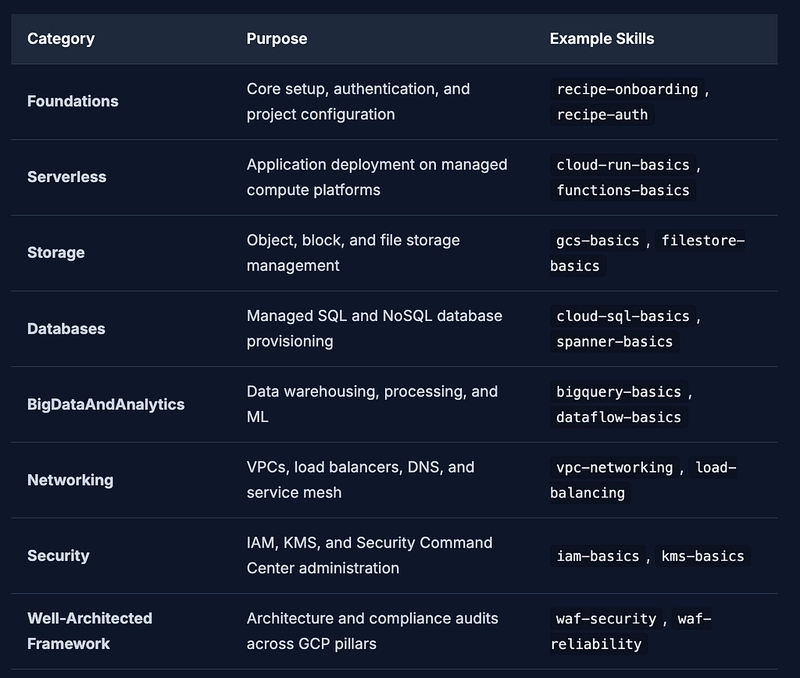
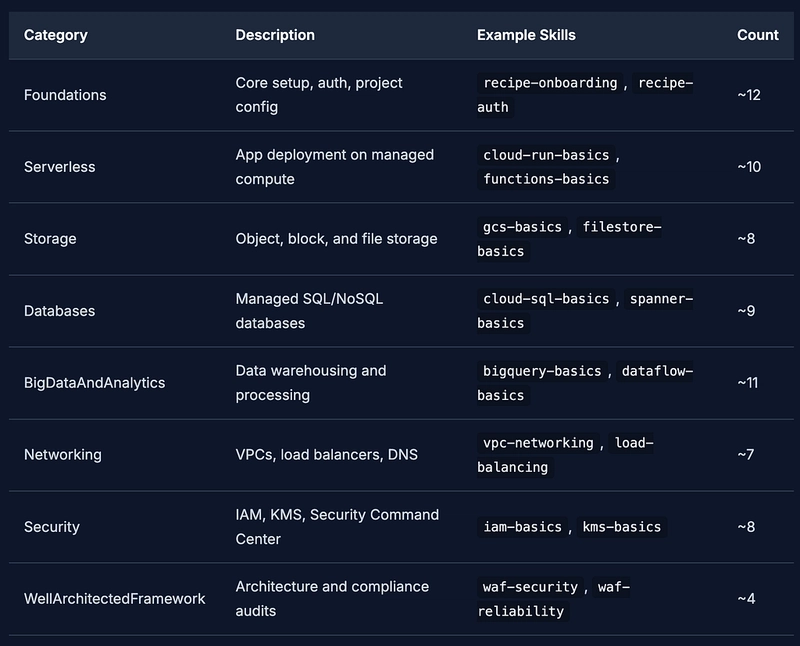
The official google/skills repository:https://github.com/google/skills is an open-source collection of these instruction sets. Built on the open standard defined at agentskills.io:https://agentskills.io/, it currently houses (at the time of writing) nearly 70+ skills spanning 8 distinct categories:
If you were to load all 70 odd instructions/details that are present in these skills into an AI agent’s context window simultaneously, the agent would become confused, slow, and expensive to run. To solve this, when it comes to Skills, Agents will use a progressive disclosure model .
Enough has been written on this topic, so we will not iterate much on that here.
This section summarizes the foundational setup required to start using Google Skills. We will explore how to get your agent environment set up with these powerful instruction sets.
Before we install anything, ensure you have the following installed on your machine:
Getting the skills onto your machine is straightforward. Ensure you have Node.js (v18+) and your AI coding agent installed. You could install specific skills that you need via the npx skills add google/skills command. But here are some ways to install the skills.
Option A: Install Only What This Tutorial Needs (Recommended) For this tutorial, we use 9 specific skills across the steps and use cases. Installing only these keeps your environment focused and is a best practice, you should install what you need, not everything.
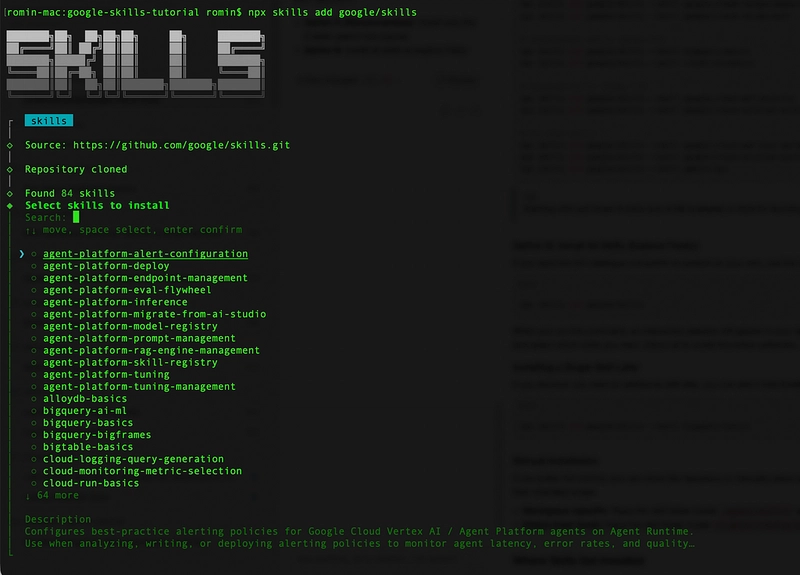
You can use the interactive CLI to install skills:
Starting with just these 9 skills is ideal for learning. You can always add more later as you explore.
For example, when I run the first command , I get the following interactive display:
It then asks you for Global or Project scope. It is advisable to go ahead with the current folder i.e. Project scope. This will create a .agents/skills folder and the skills will be placed in that.
Finally, you should see an overall report on the installation:
Here ~/agy2-projects/google-skills-tutorial/ is my folder in which I am running this tutorial. This could be something different on your machine.
Option B : Install Additional Skills (Later) If you want the full catalogue and prefer to explore on your own, use the interactive installer: If you want the full catalogue and prefer to explore on your own, use the interactive installer:
When you run this command, an interactive selector will appear in your terminal. Choose the specific skills that you are interested to install and try out.
Option C : Installing a Single Skill Later (npx command based) If you discover you need an additional skill later, you can add it individually at any time:
Manual Installation If you prefer full control, you can clone the repository or manually place skill folders in your environment. Skills can be installed in two locations depending on their intended scope:
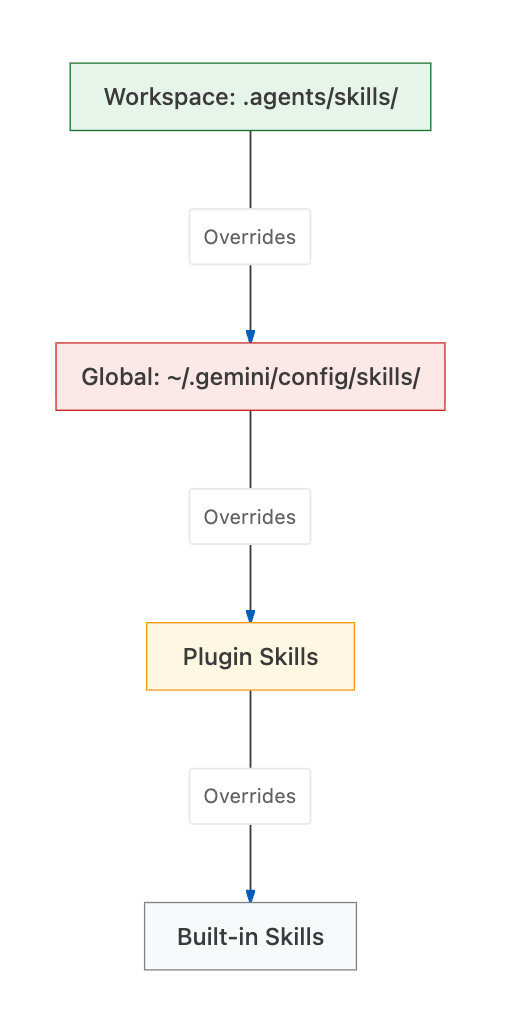
Where Skills get installed When your agent starts up, it looks for skills across several locations. It resolves them using a specific hierarchy. If a skill with the same name exists in multiple places, the one closest to the workspace takes precedence.
Verification After installation, it is good practice to verify that everything is in order.
You can list all currently installed and active skills using:
You should see something similar to this:
Alternatively, you can just peek into your directory structure to ensure the SKILL.md files are present:
If you are using Antigravity CLI, you can launch Antigravity CLI ( agy ) from the terminal. Give it the /skills command and you should see the skills listed in the workspace.
Managing Skills The CLI provides simple commands for managing your installed skills over time:
Once a skill is installed, what does it actually look like? In this step, we break down the structure of a skill following the agentskills.io standard.
The SKILL.md File The heart of every skill is the SKILL.md file. This isn't just documentation, it is executable instruction code for AI coding agents. When an agent reads this file, it learns exactly how to perform tasks, what commands to run, and what safety checks to enforce.
Let’s look at the full contents of our sample-skill/SKILL.md and break down what each section does.
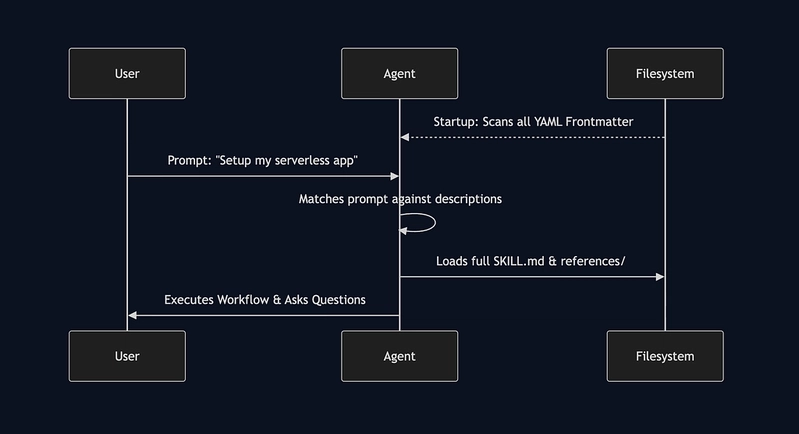
YAML Frontmatter Every SKILL.md begins with a YAML frontmatter block. This metadata is crucial for the agent's startup phase.
Markdown Body Sections The markdown body dictates the agent’s behavior. While highly flexible, Google Cloud skills typically follow a common pattern:
Workload Assessment Questions : Clarifying questions the agent should ask the user before beginning.
Validation Checklists : Steps to verify the task succeeded.
Optional Supporting Files A skill folder isn’t limited to just SKILL.md. It can contain supporting directories:
Skill Structure and Processing The diagram below is a good way to visualize how the Agent at startup scans the Skills YAML frontmatter and then handles the loading of the skill accordingly.
Let’s trace what happens when you trigger the google-cloud-recipe-onboarding skill.
User : “Help me get started with Google Cloud in my new project.”
Ensure that you have launched your favourite Agent (Antigravity, Antigravity CLI or any other) from the folder in which the .agents/skills folder is present.
I suggest that you don’t run these prompts at the moment and just observe the kind of natural language prompts that you can use to work with Google Cloud Platform via these Google Agent Skills.
1. Trigger google-cloud-recipe-onboarding
Prompt: “I want to set up my first Google Cloud project from scratch.”
Explanation: The agent will guide you through project creation, billing linking, and initial IAM setup.
2. Trigger google-cloud-recipe-auth
Prompt: “How do I authenticate my local environment to Google Cloud?”
情报判断
Aioga 编辑摘要
Google Cloud 发布官方 Agent Skills 开源指令集,基于 agentskills.io 开放标准,收录70多项技能并覆盖8个类别,用于支持AI编码智能体更安全、高效地处理多步骤云操作。

 扫码直达文章详情