Cerebras and AMD Partner on Disaggregated Inference. Learn more >>
Your Codex subscription now comes with 3 main models, Sol, Terra, and Luna, each independently trained and served:https://community.openai.com/t/introducing-gpt-5-6-series-sol-terra-and-luna-coming-july-9-10am-pt/1384931, with reasoning dials. Together, they let you choose a balance of speed, cost, and intelligence for each task.
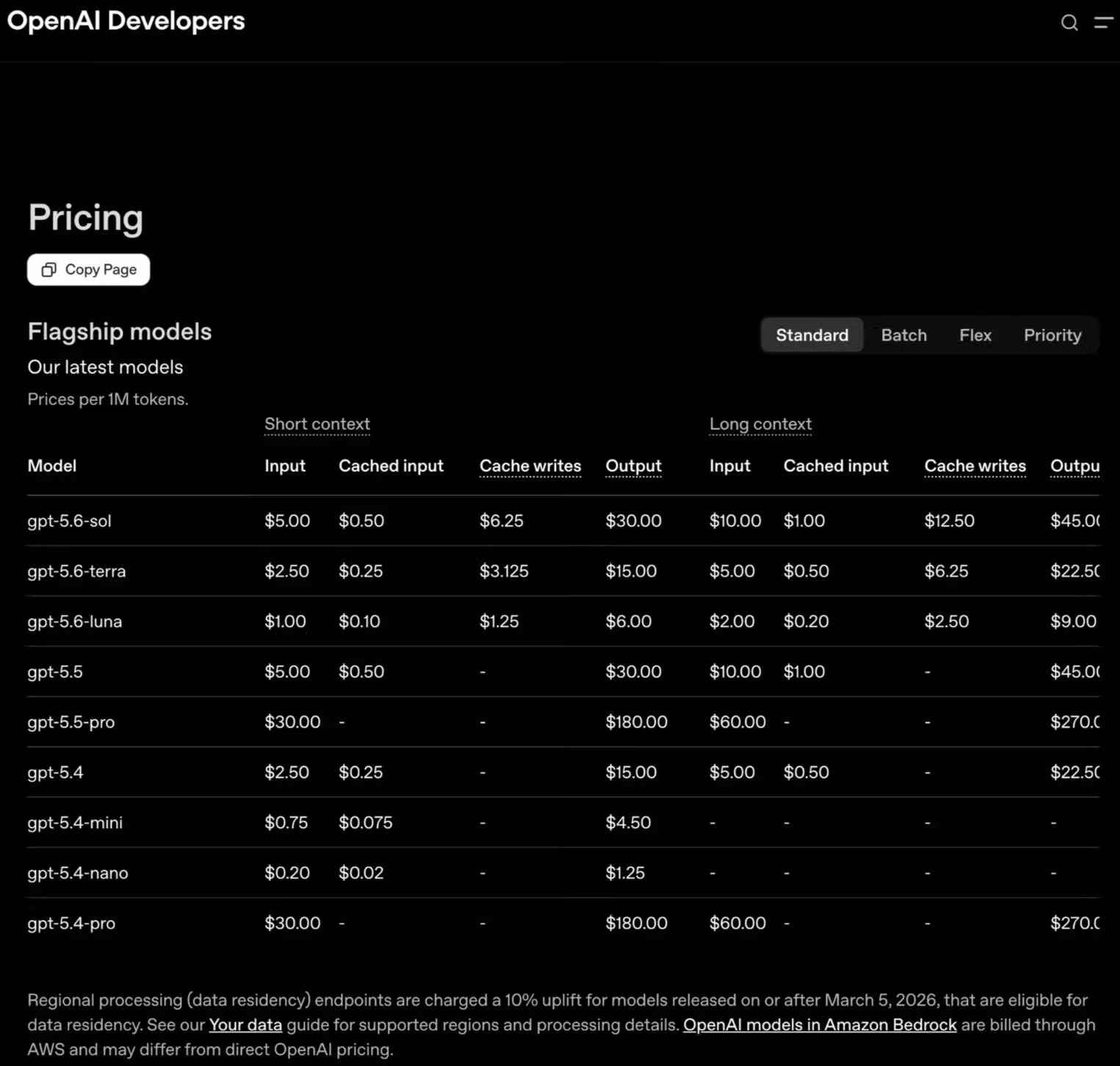
On price, Terra costs 1/2 as much as Sol, while Luna costs one-fifth as much, across both short- and long-context usage.
This pricing tracks pretty closely with intelligence and speed. In practice, each model is best suited to a different kind of work:
How do you decide which model should handle a request and how much reasoning it should apply? That choice must be made before any tokens are generated.
A simple way to approach any task is to choose the model that offers the best balance of speed and intelligence at the price you are willing to pay. Within the GPT-5.6 family :
1. GPT-5.6-Sol : Highest intelligence floor and ceiling
2. GPT-5.6-Luna: Highest speed floor and ceiling
A good default is to start most tasks with Luna, then move up to Terra or Sol when progress stalls, such as when agents get stuck, fixes stop landing, or the model begins losing the thread. If you are willing to pay more for both speed and intelligence, you can run Sol on Cerebras at 750 tokens per second:https://openai.com/index/previewing-gpt-5-6-sol/, which is up to 10x faster speed advantage than regular mode of Sol:https://artificialanalysis.ai/models/gpt-5-6-sol.
Another way to tailor how the model handles a task is by adjusting its reasoning level:https://x.com/cerebras/status/2067357992929153268. In Codex, you can choose from five options: “Light,” “Medium,” “High,” “Extra High,” and “Ultra”.
By using more computer processing time to increase the accuracy of the output, the model will produce tokens arguing with and questioning itself before giving the user an answer.
We typically reserve Ultra mode for our biggest research questions and novel challenges. Ultra mode has a tendency to drain your usage limits very quickly, but you can rest assured the model has used the full reasoning budget available to explore, verify, and refine its answer.
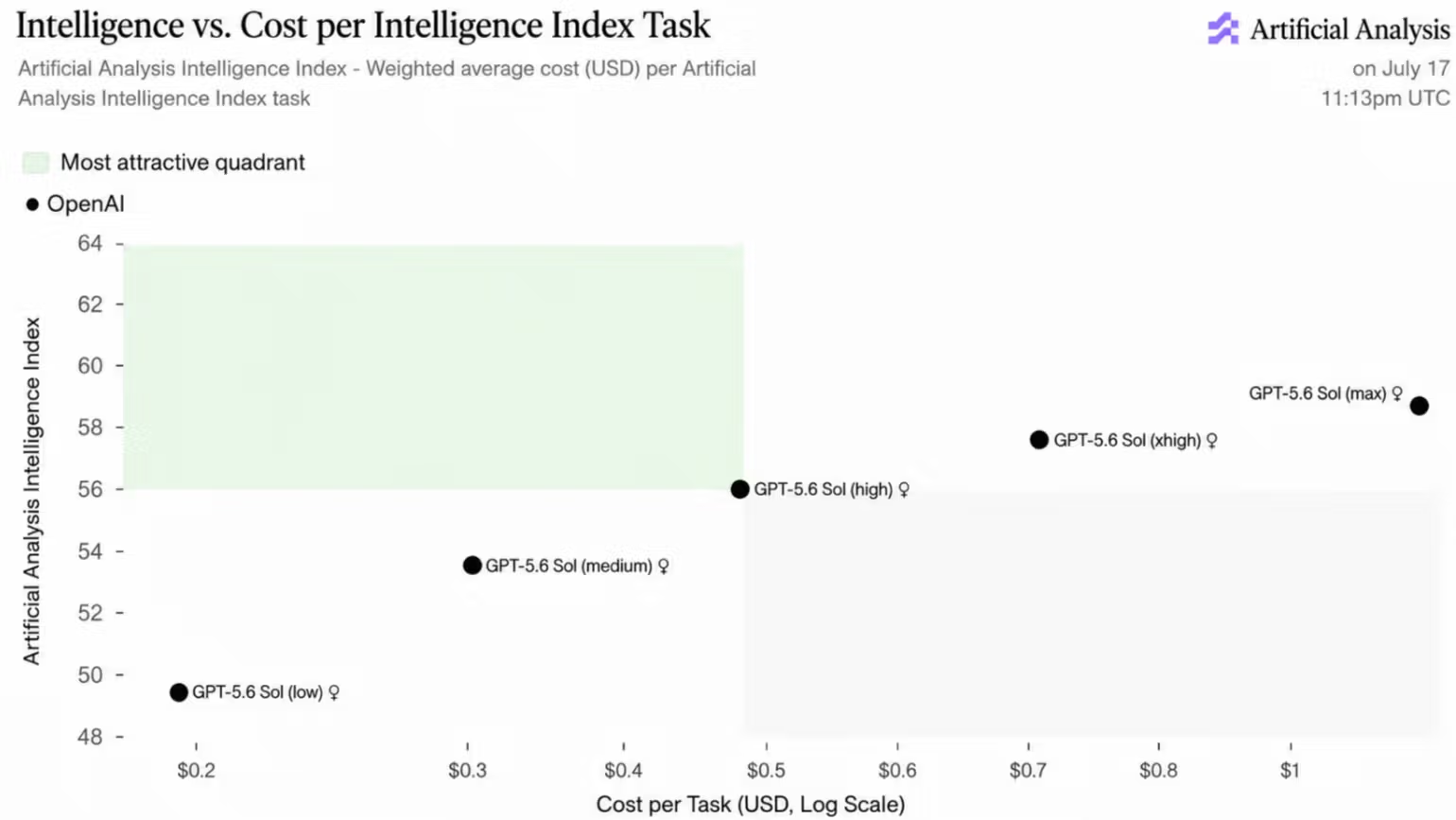
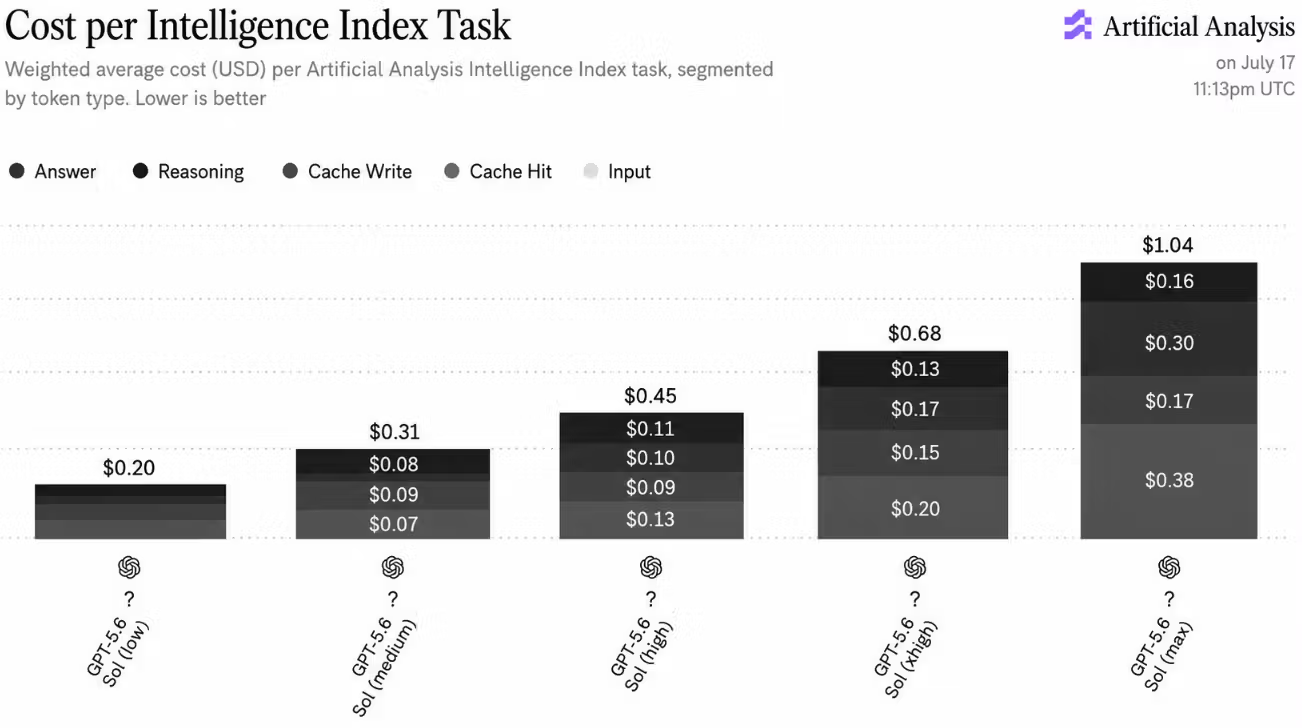
In Artificial Analysis’ testing from July 17:https://artificialanalysis.ai/models/gpt-5-6-sol/, each step up in GPT-5.6 Sol’s reasoning level increased the average cost per task by roughly 50%. The charts below show how additional reasoning affects both intelligence and cost.
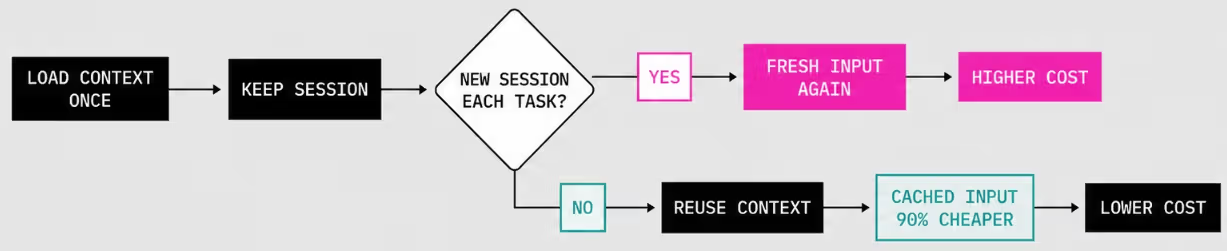
Cached input is 90% cheaper than fresh input:https://developers.openai.com/api/docs/guides/prompt-caching. Codex tasks that repeatedly process the same codebase or context benefit enormously.
Each of the GPT-5.6 models has a cache TTL of ~30 minutes:https://developers.openai.com/api/docs/guides/prompt-caching. That means maintaining a single session you work in will be better than starting a new session for each task.
Codex’s compaction has also gotten good enough that you can run a single session to hundreds of millions of tokens without even experiencing any issues.
If you keep the session hot, you’ll have much cheaper prompt processing. You can set Codex automations scheduled every 20 minutes to keep your cache alive and use those automations to drive long running processes.
Different models are trained on different data and optimized for different goals, meaning each will be slightly better or worse at certain things.
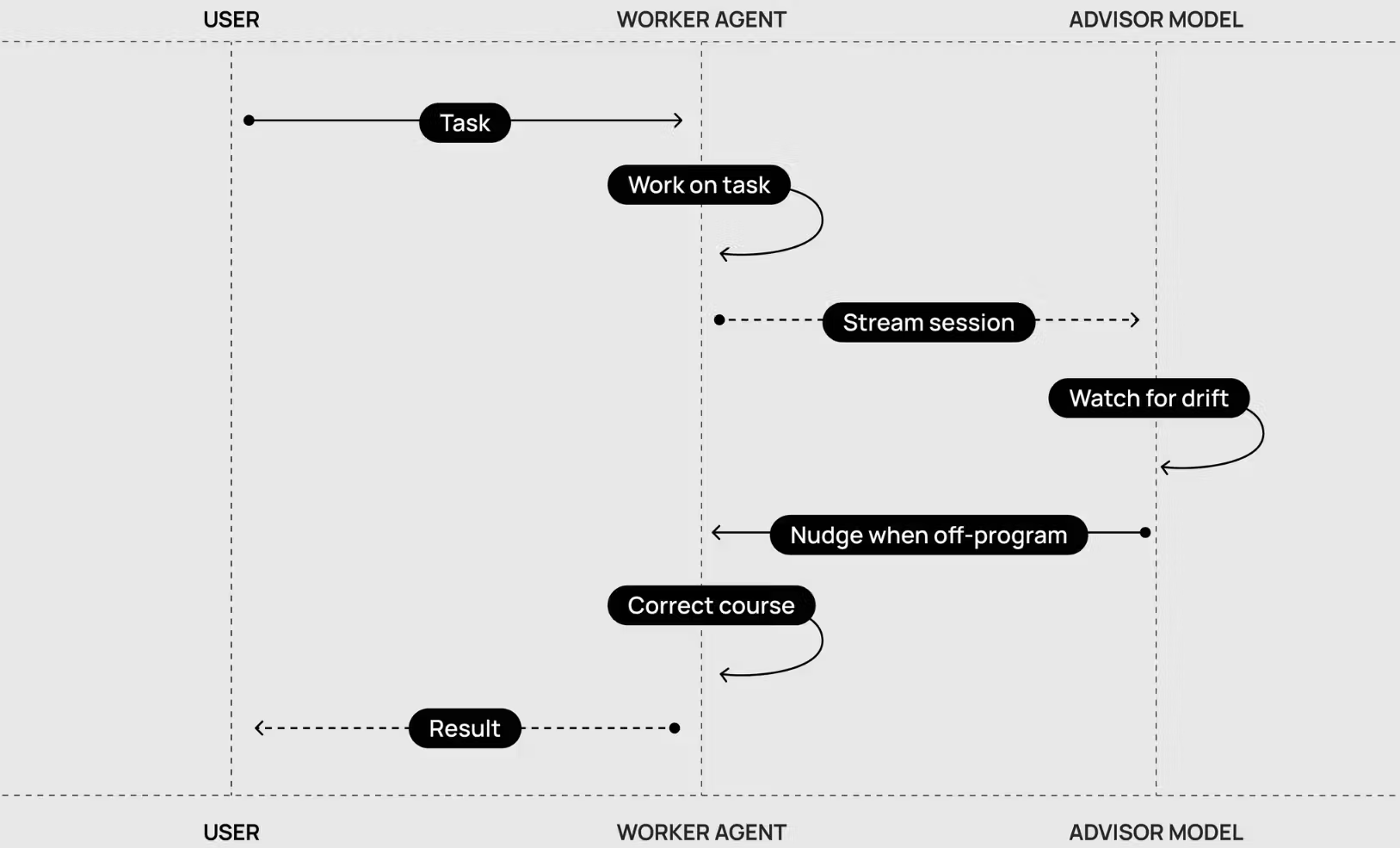
The Advisor workflow, gives one agent a narrow job: read the full session, keep track of the goal and constraints, and step in whenever the worker starts drifting. This helps automatically steer the worker and improve reliability across longer tasks.
Local Codex also lets you bring other providers to the app. This means you can experiment with lower-cost, open-weight models like Kimi K2.7 Code , or models with different strengths, such as GLM-5.2 for long-horizon reasoning and coding , while staying inside the familiar Codex experience.
You can then use these external models for bounded subagent work, helping reduce costs or take advantage of the different strengths of each model.
One important nuance: this is done through Codex configuration:https://learn.chatgpt.com/docs/config-file/config-reference and custom agent files, rather than a simple in-app model picker. Codex supports local providers such as Ollama and LM Studio, along with custom Responses-compatible providers.
Subscription usage limits are pretty generous, but as AI agents become more useful to more people, many are pushing the limits way beyond what one subscription can offer.
And even if you have the money to burn , not every “frontier” model sits at the frontier of all use cases. Often a small model can completely wipe the floor with a consortium of the world’s best models on a few benchmarks.
Speed is an important toggle, during the day when you’re interacting with your agents, high tok/s can dramatically improve your experience. During off hours, a /goal with a slow, extra reasoning model can make a world’s difference.
And lastly, keep an eye on Artificial Analysis, it’s full of high quality model speed benchmarks and intelligence indexes.
Thank you to Sarah Chieng (@MilksandMatcha), Joyce Er, and Hai-Ching for your review and input, and Halley Change (@halleychangg) for the graphic design in this blog.
Performance comparisons are based on third-party benchmarking or internal testing. Observed inference speed improvements versus GPU-based systems may vary depending on workload, configuration, date and models being tested.
1237 E. Arques Ave Sunnyvale, CA 94085
情报判断
Aioga 编辑摘要
Aioga 编辑摘要:Cerebras is the go-to platform for fast and effortless AI training. Learn more at cerebras.ai. Aioga 将其归入「技巧观点」方向,重点关注它对真实使用和行业竞争的影响。


 扫码直达文章详情